Client Script is JavaScript that runs in your team's browser while they work in Zoho CRM. It fires when a page loads, when a field changes, or when someone clicks Save, so it can fill in fields, check the data, and stop a bad record before it's ever saved. Four of the six examples below come from Client Scripts we've built for clients, and the other two are requests we get on almost every project.
If you set up Zoho CRM for your company, these are the patterns that make a layout feel like it was built for your process. If you'd rather have us build them, that's part of our Zoho CRM work.
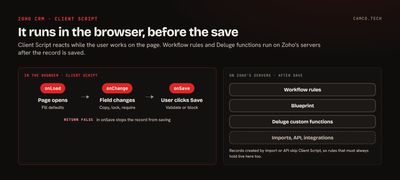
How Client Script fits in Zoho CRM
Zoho describes Client Script as "a piece of JavaScript code that runs on your web browser instead of the server." That one fact decides what it's good for.
| Client Script | Deluge custom function | Widget | |
|---|---|---|---|
| Runs | In the browser | On Zoho's servers | In the browser, in its own frame |
| Fires | Page load, field change, save | Workflow, Blueprint, button, schedule | When the user opens it |
| Best for | Instant checks and filling fields while the user types | Logic that must run no matter how the record changes | A whole custom screen inside the CRM |
A Client Script only runs when someone edits the record in the CRM's pages. Records created by an import, the API, or an integration skip it. So anything that must always be true belongs in a workflow rule or a Deluge function too. Client Script makes the screen faster and friendlier; server-side automation keeps the data right. For full custom screens inside the CRM, widgets are the tool.
The facts worth knowing before you start, from Zoho's Client Script documentation and best practices:
| What | Detail |
|---|---|
| Editions | Professional, Enterprise, and Ultimate |
| Where to build it | Setup > Developer Hub > Client Script |
| Timeout | 10 seconds per execution |
| Scripts per page | Up to 30 |
| Layouts | One script per layout; it runs only on the layout you choose |
| API calls | ZDK CRM calls use API credits |
| Outside domains | Must be added to Trusted Domains before a script can call them |
The events available depend on the page. On create and edit pages you get page events (onLoad, onChange, onSave) and field events (onChange, onType), plus subform events. Detail pages add events like onBeforeUpdate and Blueprint's beforeTransition.
1. Name every deal the same way, automatically
The problem: a B2B services company wanted deal names in a strict format, "Account-Type-Use Case-Number," so reports and email subjects lined up. Reps typed them differently every time.
The script: a field event on the deal's create page builds the name as soon as the parts are filled in, and pulls the next number by fetching the deal with the highest counter.
// FIELD EVENT: onChange OF ACCOUNT, DEAL TYPE OR USE CASE
var dealNameFld = ZDK.Page.getField('Deal_Name');
var account = ZDK.Page.getField('Account_Name').getValue();
var accountName = account ? account.name : "";
var dealType = ZDK.Page.getField('Deal_Type').getValue() || "";
var useCase = ZDK.Page.getField('Use_Case').getValue() || "";

// FETCH THE DEAL WITH THE HIGHEST COUNTER: PAGE 1, 1 RECORD, SORTED DESCENDING
var lastDeal = ZDK.Apps.CRM.Deals.fetch(1, 1, "Deal_Counter", "desc");
var dealCounter = (lastDeal.length ? lastDeal[0].Deal_Counter : 0) + 1;

if (accountName && dealType && useCase) {
    dealNameFld.setValue(accountName + "-" + dealType + "-" + useCase + "-" + dealCounter);
}
Reps never type the name again, and it can't drift. The counter here is a convenience for the screen. If two reps save at the same moment, a server-side check should own the final number.
2. Copy a value from a lookup the moment it's picked
The problem: a window tinting company's installers needed the customer's phone number on the deal itself, not one click away on the contact.
The script: when the Contact lookup changes, fetch that contact and copy the phone across.
// FIELD EVENT: onChange OF Contact_Name ON DEALS
var contactFld = ZDK.Page.getField('Contact_Name');
var contactVal = contactFld.getValue();
if (contactVal) {
    var contact = ZDK.Apps.CRM.Contacts.fetchById(String(contactVal.id));
    ZDK.Page.getField('Contact_Phone').setValue(contact.Phone);
}
Seven lines, and the field is filled before the rep has moved their mouse. The same pattern copies an account's billing terms onto a quote, or a product's lead time onto an order.
3. Block a save that would create bad data
The problem: a common one. Orders go out with quantities below the minimum the warehouse will ship, and someone has to catch it by hand.
The script: an onSave page event checks the value, shows an error on the field, and returns false, which Zoho documents as the way to stop the record from saving.
// PAGE EVENT: onSave ON THE CREATE AND EDIT PAGES
var qtyFld = ZDK.Page.getField('Quantity');
var qty = qtyFld.getValue() || 0;
if (qty < 100) {
    qtyFld.showError('The minimum order is 100 units');
    return false;
}
The rep sees the problem next to the field, fixes it, and saves. Nothing bad reaches the database, and no one gets an email about it later.
4. Lock or require fields based on another field
The problem: another common request. Once a deal is marked as a renewal, the contract start date has to be filled in and the original close date shouldn't change.
The script: a field event on Deal Type flips the other fields.
// FIELD EVENT: onChange OF Deal_Type
var isRenewal = ZDK.Page.getField('Deal_Type').getValue() === 'Renewal';
ZDK.Page.getField('Contract_Start').setMandatory(isRenewal);
ZDK.Page.getField('Original_Close_Date').setReadOnly(isRenewal);
if (isRenewal) {
    ZDK.Client.showMessage('Renewal: add the contract start date', { type: 'info' });
}
Layout rules can do some of this without code. Client Script earns its place when the condition involves several fields, a calculation, or data from another record.
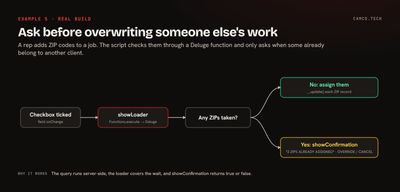
5. Ask before overwriting someone else's work
The problem: a direct-mail franchise assigns ZIP codes to clients. When a rep added ZIP codes to a job, some might already belong to another client, and quietly reassigning them would start an argument.
The script: on a checkbox change, it shows a loader, asks a Deluge function which ZIP codes are taken, and if any are, asks the rep before overriding.
// FIELD EVENT: onChange OF Run_Automation ON THE JOB
ZDK.Client.showLoader({ type: 'page', template: 'vertical-bar', message: 'CHECKING ZIP CODES' });
var zipList = (ZDK.Page.getField('All_Active_Zips').getValue() || '').split('\n');

// THE DELUGE FUNCTION RUNS THE LOOKUP SERVER-SIDE AND RETURNS JSON
var resp = ZDK.Apps.CRM.Functions.execute('check_zip_status', { zips: zipList });
var zips = JSON.parse(resp.details.output);
var taken = zips.filter(function (z) { return z.Status === 'Assigned'; });

ZDK.Client.hideLoader();
if (taken.length === 0 || ZDK.Client.showConfirmation(taken.length + ' ZIPS ALREADY ASSIGNED', 'OVERRIDE', 'CANCEL')) {
    zips.forEach(function (z) {
        var zipRec = ZDK.Apps.CRM.Zip_Codes.fetchById(z.id);
        zipRec.Status = 'Assigned';
        zipRec.Job_Lookup_Id = String($Page.record_id);
        zipRec.__update();
    });
    ZDK.Client.showMessage('ZIP codes updated', { type: 'success' });
}
Three tricks are packed in here. The loader keeps the rep from clicking around while the check runs, which matters with a 10-second timeout. The heavy query lives in a Deluge function, called with ZDK.Apps.CRM.Functions.execute, so the browser only handles the decision. In our scripts the function's return value comes back as text in details.output, which is why it's parsed with JSON.parse. And showConfirmation returns true or false, so the override is a single if.
6. Fill subform rows from product data
The problem: a manufacturer that ships sample kits had reps typing size, material, and finish into every row of a subform, even though the product record already had them.
The script: loop over the subform rows, fetch each row's product, and fill in the specs. Custom products keep whatever the rep typed.
// PAGE EVENT: onSave, OR FIELD EVENT ON THE SUBFORM
var kitsFld = ZDK.Page.getField('Sample_Kits');
var rows = kitsFld.getValue() || [];
var cleanRows = rows.map(function (row) {
    var product = ZDK.Apps.CRM.Products.fetchById(String(row.Product.id));
    if (product.Product_Name === 'CUSTOM') {
        return row; // THE REP ENTERED CUSTOM SPECS, KEEP THEM
    }
    row.Size = product.Size;
    row.Material = product.Material;
    row.Finish = product.Finish;
    return row;
});
kitsFld.setValue(cleanRows);
Each row is one API call, so keep an eye on subforms with dozens of lines. Past a handful of rows, a single Deluge function that fetches every product in one search is faster and stays inside the timeout.
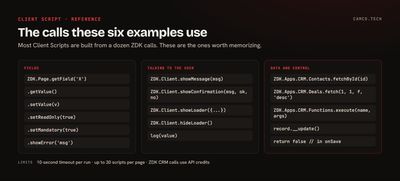
What we usually set up
When we add Client Script to a client's CRM, the same habits keep it maintainable:
- One page-level script per layout that handles several fields with a
switch, instead of a dozen tiny scripts. - Shared helpers saved as a static resource, so a fix happens in one place. Zoho allows up to 5 per page.
- A loader around anything that calls the API, so the user knows to wait.
- Heavy queries moved into a Deluge function and called with
Functions.execute. - The same rule enforced server-side when the data can arrive by import or API.
log()statements left in during testing; Zoho's Run option shows them in the Messages panel.
Where to start
Pick the one field your team complains about most, the one that's always wrong or always typed by hand, and write a script for it. It's usually ten lines, and people notice the difference the same day. Our Blueprint examples pair well with it, since Client Script can validate data right before a Blueprint transition. If you'd like us to review your layouts and build the scripts, that's our Zoho CRM work, or tell us what's slowing your team down.