Zoho MCP lets an AI assistant like Claude or ChatGPT work directly in your Zoho apps. You create a server in Zoho's MCP console, pick which actions it can take, such as searching CRM records, creating a Books invoice, or adding a Projects task, and connect your AI tool to it. From then on, you can ask in plain English and the assistant does the work in Zoho with your permissions.
We run Camco's own business this way, and we set it up for clients as part of our generative AI work. This guide covers what it is, how to set it up, and how to keep it safe.
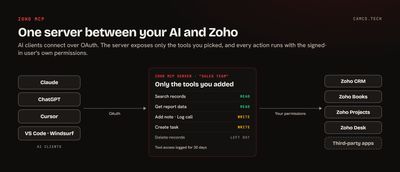
What is MCP, and what does Zoho add?
MCP, the Model Context Protocol, is an open standard for connecting AI assistants to other software. An MCP server describes a set of tools, like "search contacts" or "create a task," and an AI client calls those tools when a request needs them.
Zoho MCP is Zoho's fully managed hosting for those servers, so there's nothing to install or run yourself. Zoho describes it as model-agnostic, and its FAQ lists CRM, Mail, Calendar, Desk, Cliq, Projects, and WorkDrive among the supported apps, with Books, Creator, Bigin, Billing, People, and others in its integrations list. A single server can also include tools from third-party services such as Asana, Stripe, and GitHub.
What can you do with it?
Anything the tools you expose allow. These are the kinds of requests we make every day against our own Zoho account:
- "Which open deals over $10k haven't had any activity in two weeks?"
- "Log this call against the account and set a follow-up task for Thursday."
- "Which invoices are more than 30 days overdue, and who are the contacts on them?"
- "Create a project task for the migration and assign it to me."
- "Summarize everything that happened on this account this month."
The assistant decides which tools to call, chains them together, and shows you what it did. A question that used to mean opening a report and three records is one sentence.
Two ways to get a Zoho MCP server
| Zoho MCP console | Product servers | |
|---|---|---|
| Where | mcp.zoho.com (or your region) | Each product's own MCP page |
| What it covers | Tools you pick from many Zoho and third-party apps | One product, with tools grouped by job |
| Best for | A server built around one team's work across apps | Going deep in a single app |
| Example | Sales server with CRM, Books, and Cliq tools | Zoho CRM's Data Insights server |
Zoho CRM's MCP setup guide lists four CRM servers, each with its own URL: Data Insights, Data Operations, Module Customization, and Workflow and Process Automation. Zoho also publishes MCP guides for Projects, Mail, Assist, and Analytics.
For most businesses we start with the console, because one server can follow a deal from CRM into Books and Projects.
How to set up a Zoho MCP server
These steps follow Zoho's implementation guide.
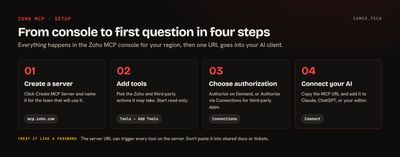
- Sign in to the console for your region and click Create MCP Server. Give it a name that says who it's for, such as "Sales team." You can also start from a pre-configured server built for a specific workflow.
- Add tools. Open Tools, click Add Tools, search for a Zoho app or third-party service, tick the tools you need, and click Add Now. Repeat for each app.
- Choose how it authorizes. Under Connections, Zoho services can use Authorize on Demand (the default) or Authorize via Connections. Third-party services use Authorize via Connections.
- Connect your AI client. Open the Connect section, copy the MCP URL, and add it to your client. The console also shows ready-made settings for the supported clients.
Use the console for the region your Zoho account lives in. Zoho's Analytics MCP docs list them:
| Region | Console |
|---|---|
| United States | mcp.zoho.com |
| Europe | mcp.zoho.eu |
| India | mcp.zoho.in |
| Australia | mcp.zoho.com.au |
| Japan | mcp.zoho.jp |
Connecting Claude, ChatGPT, Cursor, or VS Code
Zoho's guide lists Claude.ai, ChatGPT, Cursor, Windsurf, and VS Code, plus any custom client that supports HTTP or Streamable transport.
- Claude Desktop: go to Customize, then Connectors, and choose Add Custom Connector. Name it, paste the server URL, click Add, then Connect to sign in to Zoho.
- Claude for a whole organization: an admin adds the server once in Claude's organization settings, and it becomes available to everyone in the organization. Zoho's Projects guide walks through this.
- ChatGPT: add the server as a connector and choose OAuth as the authentication type.
- Cursor, Windsurf, and VS Code: paste the configuration from the console's Connect section into the editor's MCP settings.
In a new chat, turn on the Zoho connector, choose which of its tools are active, and ask.
Keeping it secure
Zoho MCP is built so the assistant can't do more than the person using it.
- Your own permissions. Sign-in uses OAuth, and the agent acts under the signed-in user's Zoho permissions. A rep who can't see another territory's deals can't see them through Claude either.
- Only the tools you choose. A server exposes only the tools you added. Leave out delete and bulk update until you need them.
- Logs. The console records tool access, and those logs are kept for 30 days.
- Revocation. You can revoke a user's tool authorization or delete a third-party connection at any time, and collaborators on the console have roles you can edit or remove.
- The URL is a key. Zoho's Payments MCP guide tells you to handle the server URL like a password, because it can trigger the tools connected to your account. Don't paste it into shared documents or tickets.
Zoho recommends keeping a server to 300 tools or fewer so the AI client chooses well. We go much smaller: one server per team, with only the tools that team uses.
What we usually set up first
- A read-only server for managers: search and report tools across CRM, Books, and Projects. Nothing that writes.
- After a week, a sales server that can also log calls, add notes, and create tasks.
- Separate servers for finance and operations, so each team sees only its own tools.
- Organization-level setup in Claude, so new hires get the connector without anyone sharing a URL.
- A short list of prompts each team runs every week, written down so people know what to ask.
Zoho MCP, Zia, or a Deluge function?
MCP works when a person is asking. For AI that runs in the background on every new lead or ticket, use Zia agents, Zoho Flow, or a Deluge function. Our post on connecting ChatGPT to Zoho CRM compares all four, and our invokeUrl guide covers the Deluge side.
Getting your team started
Start with one team and one read-only server. Watch which questions they ask for a week, then add the write tools those questions point to. If you'd like us to design the servers, set up the connections, and train your team, that's part of our generative AI and Zoho CRM work.