invokeUrl is the Deluge task that calls a web API from any Zoho function. You give it a URL, a method, and optionally headers, a body, and a connection that holds the credentials. It returns the API's response to a variable. Every integration we build between Zoho and another system starts with it.
This guide covers the syntax, the patterns we use in production, and the limits worth knowing before you build. If you'd rather have someone build the integration, that's our API integration work.
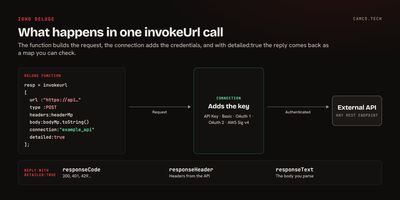
invokeUrl syntax
Here's the full task, from Zoho's invokeUrl reference:
responseMp = invokeurl
[
	url :"https://api.example.com/v1/orders"
	type :POST
	headers:headerMp
	body:bodyMp.toString()
	connection:"example_api"
	detailed:true
];| Key | Required | What it does |
|---|---|---|
url |
Yes | The endpoint. Domains with user-created (self-signed) SSL certificates can't be called. |
type |
No | GET, POST, PUT, PATCH, DELETE, or OPTIONS. Defaults to GET. |
headers |
No | A map of headers. A Content-Type here overrides Zoho's default. |
body |
No | The payload: text, a file, or a map. |
parameters |
No | Form data, or query parameters on GET and DELETE. Can't be combined with body. |
connection |
No | The link name of a connection that adds authentication. |
detailed |
No | true returns the status code, headers, and text as a map. |
response-format |
No | FILE returns the response as a file. NONE ignores it. |
response-decoding |
No | Character set for the response. Defaults to UTF-8. |
files also exists for multipart uploads in Zoho Creator. Outside Creator, Zoho recommends sending files in body with a multipart/form-data content type.
Zoho's older getUrl and postUrl functions still appear in a lot of inherited code. invokeUrl replaces both, so we convert them whenever we're already editing a function.
Store credentials in a connection, not in the code
A connection holds the login for a service. The function refers to it by name, and Zoho adds the authentication to each request. Nobody reading the function sees the key, and you can rotate the key without touching the code.
Zoho's connections documentation lists five authentication types for custom services: API Key, Basic, OAuth 1, OAuth 2, and AWS Signature Version 4. For an API key, you choose whether it travels as a header, a query string, or form data, and you name the parameter to match the API's docs.
One rule trips people up: connection: takes the link name as a literal in quotes. Put it in a variable and the function won't save.
// THIS SAVES
resp = invokeurl
[
	url :urlStr
	type :GET
	connection:"example_api"
];
// THIS DOES NOT: connection: NEEDS A LITERAL, NOT A VARIABLE
connStr = "example_api";
resp = invokeurl
[
	url :urlStr
	type :GET
	connection:connStr
];
If a script calls the same API in several places, repeat the name at each call and note it in a header comment.
POST JSON to another system
The most common pattern: something happens in Zoho, and another system needs to know. Here, a deal closes in Zoho CRM and the function posts a message to a Slack channel through an incoming webhook:
//
// WORKFLOW: DEAL CLOSED WON
// POSTS THE DEAL TO THE SALES CHANNEL IN SLACK
//
dealMp = zoho.crm.getRecordById("Deals",dealIdInt);
amountStr = ifnull(dealMp.getJSON("Amount"),0).toString();
msgStr = "Closed won: " + dealMp.getJSON("Deal_Name") + " for $" + amountStr;
bodyMp = Map();
bodyMp.put("text",msgStr);
headerMp = Map();
headerMp.put("Content-Type","application/json");
slackResp = invokeurl
[
	url :"https://hooks.slack.com/services/YOUR/WEBHOOK/URL"
	type :POST
	headers:headerMp
	body:bodyMp.toString()
	detailed:true
];
info slackResp.getJSON("responseCode");
Two details matter. bodyMp.toString() sends the map as JSON text, and the Content-Type header tells the API it's JSON. If you pass the map without toString() and without the header, Zoho sends it as form data.
Check the response before you trust it
Without detailed:true, you get only the response body, and a failed call can look like data. With it, you get a map:
| Key | Contains |
|---|---|
responseCode |
The HTTP status, such as 200, 401, or 429 |
responseHeader |
The response headers |
responseText |
The body |
We set detailed:true on every call that writes data or feeds a decision. Here's the pattern, with a retry for errors that are usually temporary and an email when it still fails:
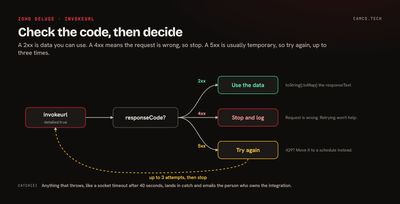
//
// GET AN ORDER FROM THE ERP, RETRY UP TO 3 TIMES ON A SERVER ERROR
//
try
{
	orderMp = Map();
	for each attemptInt in {1,2,3}
	{
		erpResp = invokeurl
		[
			url :"https://api.example.com/v1/orders/" + orderIdStr
			type :GET
			connection:"example_api"
			detailed:true
		];
		codeInt = erpResp.getJSON("responseCode");
		if(codeInt >= 200 && codeInt < 300)
		{
			orderMp = erpResp.getJSON("responseText").toString().toMap();
			break;
		}
		// 4XX MEANS THE REQUEST IS WRONG, SO RETRYING WON'T HELP
		if(codeInt < 500)
		{
			info "ERP REJECTED THE REQUEST: " + erpResp.getJSON("responseText");
			break;
		}
	}
	info orderMp;
}
catch(e)
{
	sendmail
	[
		from :zoho.loginuserid
		to :"admin@yourcompany.com"
		subject :"Error on ERP order lookup"
		message :"See error below <br> " + e
	]
}
Deluge has no while loop, so retries and pagination iterate over a short list. A 429 (too many requests) is better handled by moving the work to a scheduled function than by retrying immediately.
Page through results
Most APIs return results in pages. The same list trick works: loop over page numbers and stop when a page comes back empty.
//
// PULL ALL OPEN INVOICES FROM THE EXTERNAL BILLING SYSTEM, 100 PER PAGE
//
invoicesLst = List();
for each pageInt in {1,2,3,4,5,6,7,8,9,10}
{
	pageResp = invokeurl
	[
		url :"https://api.example.com/v1/invoices?status=open&per_page=100&page=" + pageInt
		type :GET
		connection:"example_api"
	];
	pageLst = ifnull(pageResp.getJSON("data"),List());
	if(pageLst.size() = 0)
	{
		break;
	}
	invoicesLst.addAll(pageLst);
}
info invoicesLst.size();
Ten pages is a ceiling, not a guess. If the API can return more, raise the list or run it as a scheduled function, which in Zoho CRM gets 15 minutes instead of 30 seconds.
Limits worth knowing
invokeUrl has its own limits, and the function running it has more. These are from Zoho's invokeUrl reference and Zoho CRM's function limits:
| Limit | Value |
|---|---|
| invokeUrl timeout | 40 seconds, then a socket timeout error |
| File responses from Zoho domains | 15 MB (outside Creator) |
| File responses from other domains | 5 MB |
| Zoho CRM function, button or REST API trigger | 10 seconds |
| Zoho CRM function, workflow, Blueprint, or approval trigger | 30 seconds |
| Zoho CRM function, schedule | 15 minutes |
| Zoho CRM invokeUrl requests per org per day | 5,000,000 |
| Zoho CRM lines of execution per function run | 200,000 |
The daily cap is generous. The ones that shape a design are the run-time limits. A function behind a button has 10 seconds in total, so two slow API calls can use it up. Our post on why Zoho CRM feels slow covers what that looks like when a function runs on save.
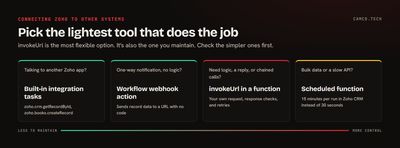
Do you need invokeUrl at all?
Not always. Check these first:
- Calling another Zoho app? Deluge has built-in integration tasks such as
zoho.crm.getRecordByIdandzoho.books.createRecord. They're shorter than building the API call yourself. - A one-way notification with no logic? Zoho CRM workflow rules include a webhook action that sends record data to a URL with no code.
- A standard pairing like CRM and ChatGPT? Zoho Flow may already have the actions you need.
invokeUrl is the right choice when you need to transform data, read the response, chain calls, or talk to an API nobody has prebuilt a connector for.
When invokeUrl fails: what we check first
Error due to - '{0}'returned instantly. Look at the connection before the payload. In our experience this usually means the request never left Deluge, most often because the connection is missing a scope or needs re-authorizing. A real HTTP failure takes longer and logs a status code.- 401 or 403. The connection's token expired or lacks permission. Re-authorize it in Setup > Developer Hub > Connections.
- Socket timeout. The API took more than 40 seconds. Ask for less data per call, or move the work to a schedule.
- The API says the body is empty. You used
parameterswhere the API expects a JSONbody, or left out theContent-Typeheader. - The API only accepts allowlisted IPs. Zoho's calls come from Zoho's servers, not your office, so plan the allowlist before you build.
What we usually change in inherited integrations
- Convert
getUrlandpostUrlto invokeUrl. - Move API keys out of the code and into connections.
- Add
detailed:trueand a status check to every call that writes data. - Wrap integrations in try/catch with an email to whoever owns them.
- Move bulk syncs from workflows to scheduled functions.
- Replace one-call-per-record loops with the API's bulk endpoint where it has one.
Building an integration that lasts
A good Zoho integration has its credentials in a connection, checks every response, tells someone when it fails, and runs where it has enough time. That's the standard we build to on our API integration and process automation projects, and it's often what we fix on Zoho rescue work. If you have a system Zoho needs to talk to, tell us what it is.