Any standalone function in Zoho CRM can become a REST endpoint. Turn on its REST API option, and Zoho gives you a URL that other systems can post to: a form tool, a website, a payment processor, a calling platform. The function reads the request through crmAPIRequest, does its work in Deluge, and can send back a proper status code with crmAPIResponse. No middleware, no server of your own.
We use this on most of our API integration projects that push data into Zoho CRM. This guide covers the setup and three patterns from real builds: a webhook router, a callback that finds its way back to the right record, and a catcher for jobs that finish later.
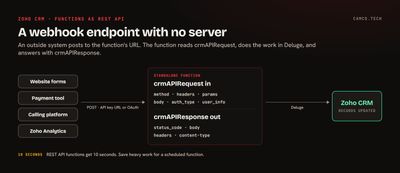
Turning a function into an endpoint
From Zoho's guide to exposing functions as REST APIs:
- Write the function as a standalone function in Setup > Developer Hub > Functions. Zoho recommends standalone functions for REST endpoints.
- Open the function, go to the Overview tab, and find the REST API section.
- Choose how callers authenticate. Zoho generates a unique endpoint URL for the function.
- Give that URL to the system that will call it.
The endpoint accepts GET, POST, PUT, and DELETE.
API key or OAuth?
| API key | OAuth 2.0 | |
|---|---|---|
| How the caller proves itself | Holding the URL | A Zoho access token in the Authorization header |
| Token refresh | None | The caller refreshes expired tokens |
| Fits | Inbound webhooks from tools that can only post to a URL | Partner systems and your own apps that can run an OAuth flow |
With an API key, the URL is the secret. Zoho's guide says anyone with it can invoke the function, so keep it out of front-end code, shared documents, and public repositories. For webhooks, we add a second check: most senders can include a shared secret in a header or field, and the function rejects any request that doesn't carry it.
Reading the request
Everything the caller sent arrives in crmAPIRequest:
| Key | Contains |
|---|---|
method |
GET, POST, PUT, or DELETE |
headers |
The request headers |
params |
Query string parameters |
body |
The raw body, usually JSON |
auth_type |
How the caller authenticated |
file_content |
An uploaded file, if there is one |
user_info |
The authenticated user and organization |
A minimal webhook catcher:
//
// WEBHOOK CATCHER: CHECK THE SHARED SECRET, THEN READ THE PAYLOAD
//
headersMp = ifnull(crmAPIRequest.getJSON("headers"),Map());
if(headersMp.getJSON("x-webhook-secret") != "REPLACE_WITH_YOUR_SECRET")
{
	respMp = Map();
	respMp.put("status_code",401);
	respMp.put("body","unauthorized");
	return {"crmAPIResponse":respMp};
}
bodyMp = crmAPIRequest.getJSON("body");
eventStr = ifnull(bodyMp.getJSON("event"),"");
info "EVENT RECEIVED: " + eventStr;
Log the raw body with info while you're building. The function's logs in Developer Hub show exactly what the sender posts, which is often not quite what its documentation says.
Sending a response back
By default the endpoint returns 200 with whatever the function returns. When the caller needs a specific status, return a map under crmAPIResponse:
//
// TELL THE CALLER WHAT HAPPENED: 201 ON CREATE, 400 ON BAD INPUT
//
respMp = Map();
if(emailStr = "")
{
	respMp.put("status_code",400);
	respMp.put("body",{"error":"email is required"}.toString());
	return {"crmAPIResponse":respMp};
}
createResp = zoho.crm.createRecord("Leads",leadMp);
respMp.put("status_code",201);
respMp.put("body",{"lead_id":createResp.getJSON("id")}.toString());
return {"crmAPIResponse":respMp};
The keys are status_code (a number), body (a string), and optionally headers and content-type, which defaults to JSON. A value of the wrong type returns a PATTERN_NOT_MATCHED error, so convert maps to strings with toString() before you put them in body.
Status codes matter more than they look. Most webhook senders retry when they get an error, so a 400 for a payload you'll never accept stops pointless retries, and a 200 tells the sender to move on.
Pattern 1: one endpoint, many event types
A website that sends products, orders, customers, courses, and tickets doesn't need five endpoints. On one integration between a WordPress site and Zoho CRM, a single endpoint reads the object type and hands the payload to a parser function written for that type:
//
// WEBHOOK ROUTER: ONE ENDPOINT, ONE PARSER FUNCTION PER OBJECT TYPE
//
dataMp = crmAPIRequest.getJSON("body");
objectStr = ifnull(dataMp.getJSON("data_object"),"");
if(objectStr.containsIgnoreCase("product"))
{
	standalone.catch_parse_wp_product(dataMp);
}
else if(objectStr.containsIgnoreCase("order"))
{
	standalone.catch_parse_wp_order(dataMp);
}
else if(objectStr.containsIgnoreCase("customer"))
{
	standalone.catch_parse_wp_customer(dataMp);
}
else if(objectStr.containsIgnoreCase("course"))
{
	standalone.catch_parse_wp_course(dataMp);
}
return "";
The router stays short and never changes when a parser does. Each parser is a normal standalone function you can test on its own by passing it a sample payload, and adding a new event type is one more branch. Order matters with containsIgnoreCase: test the more specific names first, so "product_variant" reaches its own parser before the "product" branch catches it.
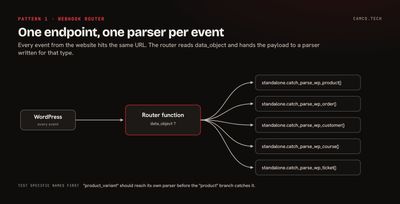
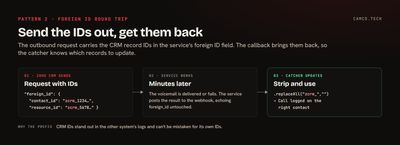
Pattern 2: send the CRM ID out, get it back in the callback
Many services work asynchronously. You ask them to do something, such as sending a ringless voicemail, and they post the result to your webhook minutes later. The hard part is knowing which CRM record that result belongs to.
The answer is to send the CRM record IDs out with the request. Most services have a metadata, reference, or "foreign ID" field that they echo back in every webhook. On one build that sends voicemails from Zoho CRM, the outbound request carries the contact's ID and the related record's ID, each with a zcrm_ prefix. When the delivery result comes back, the catcher strips the prefix and knows exactly which records to update:
//
// DELIVERY CALLBACK: THE IDS WE SENT OUT COME BACK IN foreign_id
//
bodyMp = crmAPIRequest.getJSON("body");
contactIdStr = bodyMp.getJSON("foreign_id").getJSON("contact_id").replaceAll("zcrm_","");
resourceIdStr = bodyMp.getJSON("foreign_id").getJSON("resource_id").replaceAll("zcrm_","");
statusStr = ifnull(bodyMp.getJSON("status"),"");
// LOG THE OUTCOME AS A CALL ON THE CONTACT, LINKED TO THE RELATED RECORD
callMp = Map();
callMp.put("Subject","Voicemail " + statusStr);
callMp.put("Who_Id",contactIdStr);
callMp.put("$se_module","Resources");
callMp.put("What_Id",resourceIdStr);
callMp.put("Call_Type","Outbound");
// ISO 8601 WITH YOUR ORG'S UTC OFFSET, E.G. -04:00 FOR EASTERN DAYLIGHT TIME
callMp.put("Call_Start_Time",zoho.currenttime.toString("yyyy-MM-dd'T'HH:mm:ss") + utcOffsetStr);
createResp = zoho.crm.createRecord("Calls",callMp);
info createResp;
No searching by phone number, no guessing. The prefix also makes the IDs easy to spot in the other system's logs and stops them being mistaken for that system's own IDs.
Pattern 3: catch a job that finishes later
Some APIs take a while: big exports, file conversions, data enrichment. Instead of polling, give them the function's URL as a callback. Zoho Analytics works this way. Its asynchronous bulk export accepts a callbackUrl, and Zoho posts the job's details there when the export finishes or fails.
On a build that syncs a large advisor database from Zoho Analytics into Zoho CRM, a scheduled function starts the export with the CRM function's URL as the callback. When the export is ready, the callback receives a body that includes the downloadUrl, fetches the file, and syncs the rows:
//
// ANALYTICS EXPORT CALLBACK: FETCH THE FINISHED FILE FROM THE downloadUrl
//
bodyMp = crmAPIRequest.getJSON("body");
downloadUrlStr = bodyMp.getJSON("downloadUrl");
zaHeaderMp = Map();
zaHeaderMp.put("ZANALYTICS-ORGID",zaOrgIdStr);
exportResp = invokeurl
[
	url :downloadUrlStr
	type :GET
	headers:zaHeaderMp
	connection:"zanalytics"
];
rowsLst = ifnull(exportResp.getJSON("data"),List());
info "ROWS TO SYNC: " + rowsLst.size();
Watch the clock here. Zoho's function limits give functions called through the REST API 10 seconds, while scheduled functions get 15 minutes. When a callback could bring in more rows than you can process in 10 seconds, keep the catcher thin: save the download URL to a record and return. A scheduled function then picks up the saved URL and does the heavy lifting with time to spare.
Things to get right
- Make catchers safe to run twice. Senders retry. Before creating a record, check whether one with the sender's event or order ID already exists, or use an upsert.
- Return fast. Do the minimum while the sender waits, and move slow work to a schedule.
- Check a shared secret on API-key endpoints, as shown above.
- Remember the quota. Calls to function endpoints count toward the organization's daily API limit, according to Zoho's guide.
- Keep one place to look. Log each payload and outcome, either with
infoor to a log module, so "did we get that webhook?" has an answer.
When the function needs to call out to other systems as part of handling the webhook, our invokeUrl guide covers the outbound side, including error handling and retries. And if the incoming data needs cleaning before it lands in CRM, the dedupe pattern in our Deluge tips post applies here too.
Connecting your systems to Zoho CRM
A function endpoint is often all it takes to get a website, payment tool, or calling platform talking to Zoho CRM. If you have a system that needs to push data in, or callbacks that need to land on the right records, that's what our API integration and Zoho CRM work covers.