COQL is Zoho CRM's query language: SQL-style SELECT statements that fetch records, follow lookup fields to related records, filter by date ranges, and total or count values by group. From Deluge, you send the query to the COQL endpoint with invokeUrl and get back exactly the fields you asked for. For questions that need joins, date ranges, or totals, COQL is the tool.
It's the tool for questions that cross modules, such as "open deals closing this quarter at accounts in Florida," and it fits naturally into the integrations and reports on our API integration projects. This guide covers the syntax, the patterns we reuse, and the limits that decide when to switch to Bulk Read.
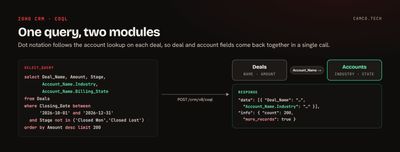
When COQL beats searchRecords
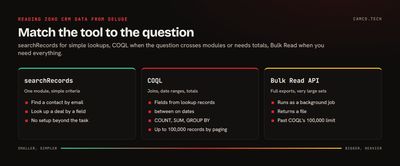
zoho.crm.searchRecords is the right tool for simple lookups in one module: find the contact with this email, or the deal with this ID. COQL is worth the extra setup when you need any of these:
| You need | Why COQL |
|---|---|
| Fields from a related record | Dot notation follows lookups, so one query returns deal and account fields |
| A date range | between and >= work on Date and DateTime fields |
| Only certain fields | SELECT returns the columns you name, not the whole record |
| Totals or counts | COUNT, SUM, AVG, MIN, and MAX with GROUP BY |
| Records matching a list | in and not in accept up to 100 values |
Zoho's own Zoho Sheet guide reaches for COQL for the same reason: it needs a date range, which the Get Records API doesn't filter on.
Running COQL from Deluge
There's no zoho.crm task for COQL, so you call the endpoint with invokeUrl. Create a Zoho CRM connection with the ZohoCRM.coql.READ scope plus a modules READ scope (such as ZohoCRM.modules.ALL or ZohoCRM.modules.deals.READ), as listed in Zoho's COQL API reference. Then:
//
// OPEN DEALS CLOSING THIS QUARTER, WITH THE ACCOUNT'S INDUSTRY AND STATE
//
queryStr = "select Deal_Name, Amount, Stage, Closing_Date, Account_Name.Industry, Account_Name.Billing_State from Deals where Closing_Date between '2026-10-01' and '2026-12-31' and Stage not in ('Closed Won','Closed Lost') order by Amount desc limit 200";
queryMp = Map();
queryMp.put("select_query",queryStr);
coqlResp = invokeurl
[
	url :"https://www.zohoapis.com/crm/v8/coql"
	type :POST
	parameters:queryMp.toString()
	connection:"zcrm_coql"
];
dealsLst = ifnull(coqlResp.getJSON("data"),List());
for each dealMp in dealsLst
{
	info dealMp.getJSON("Deal_Name") + " | " + dealMp.getJSON("Account_Name.Industry");
}
Three things to know about the response. Records come back in data, each with its id and the fields you selected. info.count is how many came back, and info.more_records says whether there are more. Joined fields come back under their dot-notation name, so you read Account_Name.Industry as a key. If the account is in a different data center, change the domain (zohoapis.eu, zohoapis.in, and so on).
Use field API names, not labels. Setup > Developer Hub > APIs and SDKs lists them, or the Field Metadata API returns them.
Joins through lookup fields
Dot notation follows a lookup to the record it points at. On Deals, Account_Name is the account lookup, so Account_Name.Industry is the account's industry. On Contacts it works the same way:
select Last_Name, Email, Account_Name.Account_Name, Account_Name.Billing_State
from Contacts
where Account_Name.Billing_State = 'FL' and Email is not null
You can follow more than one hop. Zoho's COQL overview uses Account_Name.Parent_Account.Account_Name to reach a parent account's name from a contact. Three limits shape what's possible: a query allows a maximum of two joins, paths deeper than three levels must be wrapped in single quotes, and multi-select lookups can't be selected directly. For those, query the linking module that holds the pairs.
Aliases keep the output readable. select Account_Name.Industry as 'Industry' from Deals returns the key Industry instead of the dotted name.
Totals by group: pipeline in one call
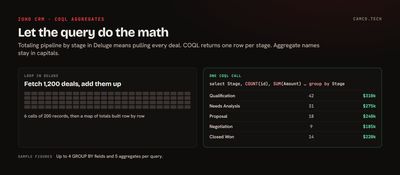
COQL can do the math that would otherwise mean looping through every record:
//
// PIPELINE BY STAGE FOR DEALS CLOSING THIS QUARTER
// AGGREGATE NAMES ARE CASE-SENSITIVE, SO COUNT AND SUM STAY IN CAPITALS
//
queryMp = Map();
queryMp.put("select_query","select Stage, COUNT(id), SUM(Amount) from Deals where Closing_Date between '2026-10-01' and '2026-12-31' group by Stage");
pipeResp = invokeurl
[
	url :"https://www.zohoapis.com/crm/v8/coql"
	type :POST
	parameters:queryMp.toString()
	connection:"zcrm_coql"
];
for each rowMp in ifnull(pipeResp.getJSON("data"),List())
{
	info rowMp;
}
One row per stage comes back instead of hundreds of deals. Zoho allows up to 4 GROUP BY fields and 5 aggregate fields per query. The detail that trips people up: COQL keywords aren't case-sensitive, but aggregate function names are. sum(Amount) fails where SUM(Amount) works.
Operators by field type
Which comparisons you can use depends on the field type. From Zoho's reference:
| Field type | Operators |
|---|---|
| Text, picklist | =, !=, like, not like, in, not in, is null, is not null |
| Lookup | =, !=, in, not in, is null, is not null |
| Date, DateTime, number | =, !=, >, >=, <, <=, between, not between, in, not in, is null, is not null |
| Boolean | = |
like with % handles "contains" and "starts with": where Account_Name like 'Acme%'. Encrypted fields only support is null and is not null, and encrypted numeric fields also allow = and !=.
Paging past the first batch
Zoho's COQL overview lists a default of 200 records per call and a maximum of 2,000, with the API credit cost rising from 1 to 3 as the limit grows. When info.more_records is true, ask for the next page with an offset, written limit offset, count. Deluge has no while, so loop over a list and stop when the API says you're done:
//
// PULL EVERY MATCHING CONTACT, 200 AT A TIME
//
allLst = List();
pageSizeInt = 200;
for each pageInt in {0,1,2,3,4,5,6,7,8,9}
{
	queryMp = Map();
	queryMp.put("select_query","select Last_Name, Email from Contacts where Lead_Source = 'Trade Show' order by id limit " + (pageInt * pageSizeInt) + ", " + pageSizeInt);
	pageResp = invokeurl
	[
		url :"https://www.zohoapis.com/crm/v8/coql"
		type :POST
		parameters:queryMp.toString()
		connection:"zcrm_coql"
	];
	pageLst = ifnull(pageResp.getJSON("data"),List());
	allLst.addAll(pageLst);
	// A SHORT PAGE MEANS THERE'S NOTHING LEFT TO FETCH
	if(pageLst.size() < pageSizeInt)
	{
		break;
	}
}
info allLst.size();
Sort by id when you page. Without a stable order, records can shift between pages while people are editing. Pagination reaches up to 100,000 records for one set of criteria. Past that, or for a full export, use the Bulk Read API, which runs as a background job and returns a file.
Limits worth knowing
| Limit | Value |
|---|---|
| Fields in SELECT | 500 (v8) |
| Criteria in WHERE | 25 |
Values in in / not in |
100 |
| Joins per query | 2 |
| ORDER BY fields | 10 |
| GROUP BY fields | 4 |
| Aggregate fields | 5 |
| Records per call | 200 by default, up to 2,000 |
| Records through pagination | 100,000 per set of criteria |
The in limit is the one that bites in practice. If you have 300 record IDs to check, split them into chunks of 100 with subList and run one query per chunk. Our post on Deluge tips from a real build shows the chunking loop.
Errors you'll see
SYNTAX_ERROR: a missingfromorwhere, unbalanced parentheses, or a statement other than SELECT.INVALID_QUERY: a field label instead of an API name, an operator the field type doesn't support, or a value of the wrong type.LIMIT_EXCEEDED: too many fields, joins,invalues, or aggregates.OAUTH_SCOPE_MISMATCH: the connection is missingZohoCRM.coql.READor a modules scope.
Add detailed:true to the invokeUrl call while you're building, so you can see the status code and message. Our invokeUrl guide covers that pattern.
Where COQL fits
- Scheduled digests. A weekly function that totals pipeline by stage and owner and emails it to sales leadership.
- Data checks before an import. One query to find which of a batch of emails already exist, instead of one search per row.
- Cross-module views. Contacts at accounts in a territory, deals with the account's industry, for a custom report or widget.
- AI and MCP context. Pulling exactly the fields a summary needs before sending them anywhere. Our post on connecting ChatGPT to Zoho CRM covers the rest of that setup.
Getting more out of your CRM data
COQL turns "can we even get that out of Zoho?" into a one-query answer. If you need reports, digests, or integrations built on questions your standard reports can't answer, that's the kind of work our API integration and Zoho CRM projects cover.