These five Deluge techniques come from one project: a data enrichment app we built in Zoho Creator for a sales development agency. The app imports lead lists from CSV, looks up missing mobile numbers and company details through four paid data providers, and cleans up duplicates. Every tip below solved a real problem in that build, and each one works in any Zoho app that runs Deluge.
If you build in Creator or write Deluge for Zoho CRM, these should save you some time. If you'd rather have us build it, that's our Zoho Creator work.
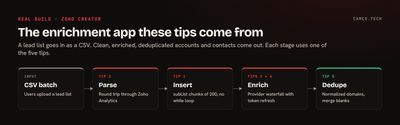
The code below is adapted from the production app. Client details, IDs, and provider names are replaced with placeholders.
1. Loop a set number of times without while
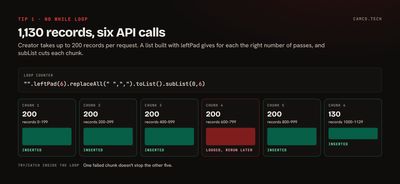
Deluge has for each but no while. When you need to run something a set number of times, such as once per batch of records, build a list of that length and loop over it:
// BUILD A LIST WITH loopCount ITEMS SO for each RUNS loopCount TIMES
iterationLst = "".leftPad(loopCount).replaceAll(" ",",").toList().subList(0,loopCount);
leftPad makes a string of spaces, replaceAll turns them into commas, and toList splits on the commas. subList trims the result to exactly loopCount items. The values are empty; only the count matters.
The place this paid off was inserting records. Zoho Creator's Add Records API takes up to 200 records per request, and an imported lead list can have thousands. So the app splits the list into chunks of 200 and sends one request per chunk:
//
// INSERT cleanDataLst INTO CREATOR, 200 RECORDS PER CALL
//
chunkSize = 200;
totalSize = cleanDataLst.size();
loopCount = totalSize / chunkSize;
if(totalSize % chunkSize != 0)
{
	loopCount = loopCount + 1;
}
iterationLst = "".leftPad(loopCount).replaceAll(" ",",").toList().subList(0,loopCount);
chunkIndex = 0;
for each el in iterationLst
{
	startIndex = chunkIndex * chunkSize;
	endIndex = startIndex + chunkSize;
	if(endIndex > totalSize)
	{
		endIndex = totalSize;
	}
	payloadMp = Map();
	payloadMp.put("data",cleanDataLst.subList(startIndex,endIndex));
	try
	{
		insertResp = invokeurl
		[
			url :"https://www.zohoapis.com/creator/v2.1/data/OWNER/APP/form/Batch_Accounts"
			type :POST
			parameters:payloadMp.toString()
			connection:"zcreator"
		];
		info "CHUNK " + (chunkIndex + 1) + " INSERTED";
	}
	catch(e)
	{
		// ONE BAD CHUNK SHOULDN'T STOP THE OTHERS
		info "CHUNK " + (chunkIndex + 1) + " FAILED: " + e;
	}
	chunkIndex = chunkIndex + 1;
}
The try/catch sits inside the loop on purpose. If chunk 7 of 20 fails, the other 19 still go in, and the log says exactly which one to rerun.
2. Use Zoho Analytics as a CSV parser
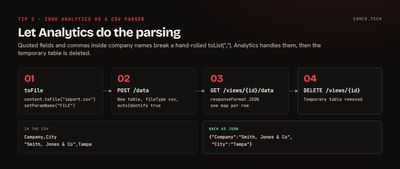
Users upload lead lists as CSV files. Parsing CSV by hand in Deluge is fragile: quoted fields, commas inside company names, and line breaks inside notes all break a simple toList(",").
Zoho Analytics already parses CSV well. So the app uploads the file to Analytics as a temporary table, reads the rows back as JSON, and deletes the table:
//
// PARSE THE UPLOADED CSV BY ROUND-TRIPPING IT THROUGH ZOHO ANALYTICS
//
zaHeaderMp = Map();
zaHeaderMp.put("ZANALYTICS-ORGID",zaOrgIdStr);
// 1. MAKE THE UPLOAD A FILE OBJECT NAMED "FILE"
csvFile = batch.Import_Accounts.content.toFile("import.csv");
csvFile.setParamName("FILE");
// 2. IMPORT IT AS A NEW TABLE, LETTING ANALYTICS DETECT THE COLUMNS
zaConfigMp = Map();
zaConfigMp.put("tableName","tmp_import_" + zoho.currenttime.toString("yyyyMMddHHmmss"));
zaConfigMp.put("fileType","csv");
zaConfigMp.put("autoIdentify","true");
importResp = invokeurl
[
	url :"https://analyticsapi.zoho.com/restapi/v2/workspaces/" + zaWorkspaceIdStr + "/data?CONFIG=" + zoho.encryption.urlEncode(zaConfigMp.toString())
	type :POST
	headers:zaHeaderMp
	files:csvFile
	connection:"za"
];
viewIdStr = importResp.getJSON("data").getJSON("viewId");
// 3. READ THE ROWS BACK AS JSON
readConfigMp = Map();
readConfigMp.put("responseFormat","JSON");
readParamsMp = Map();
readParamsMp.put("CONFIG",readConfigMp.toString());
rowsResp = invokeurl
[
	url :"https://analyticsapi.zoho.com/restapi/v2/workspaces/" + zaWorkspaceIdStr + "/views/" + viewIdStr + "/data"
	type :GET
	parameters:readParamsMp
	headers:zaHeaderMp
	connection:"za"
];
rowsLst = rowsResp.getJSON("data").toList();
// 4. CLEAN UP THE TEMPORARY TABLE
deleteResp = invokeurl
[
	url :"https://analyticsapi.zoho.com/restapi/v2/workspaces/" + zaWorkspaceIdStr + "/views/" + viewIdStr
	type :DELETE
	headers:zaHeaderMp
	connection:"za"
];
Each row comes back as a map keyed by the CSV's column headers, ready to loop over. The import endpoint is documented in Zoho's Analytics API, which also notes a 20 MB file limit. Two things make it work: toFile plus setParamName("FILE") turns the uploaded content into the multipart field Analytics expects, and a timestamp in the table name keeps two imports running at once from colliding.
If the account already has Zoho Analytics, as Zoho One accounts do, this costs nothing extra.
3. Build a provider waterfall that stops paying once it has an answer
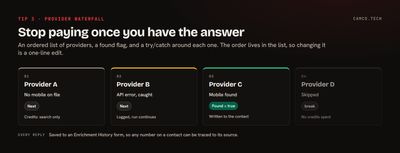
The app finds mobile numbers using four paid data providers. Each lookup costs credits, so the order matters: try the cheapest or most likely source first, and stop the moment one returns a number.
The pattern is an ordered list, a found flag, and a try/catch around each provider:
//
// MOBILE NUMBER WATERFALL: STOP AT THE FIRST PROVIDER THAT RETURNS ONE
//
providerLst = {"provider_a","provider_b","provider_c","provider_d"};
mobileFoundBool = false;
for each providerStr in providerLst
{
	if(mobileFoundBool = true)
	{
		break;
	}
	try
	{
		if(providerStr = "provider_a")
		{
			resultMp = thisapp.providerA.enrichMobile(recId);
		}
		else if(providerStr = "provider_b")
		{
			resultMp = thisapp.providerB.enrichMobile(recId);
		}
		// ... ONE BRANCH PER PROVIDER
		phoneStr = ifnull(resultMp.getJSON("mobile_number"),"");
		if(phoneStr.trim() != "")
		{
			contactRec.Mobile_Phone=phoneStr;
			mobileFoundBool = true;
		}
	}
	catch(e)
	{
		// A PROVIDER OUTAGE MOVES US TO THE NEXT ONE, IT DOESN'T END THE RUN
		info providerStr + " FAILED: " + e;
	}
}
Three details made it work in production:
- The order is data, not code. Reordering providers, or dropping one when a contract ends, is a one-line change to the list.
- Search before you enrich. Some providers have a free or cheap search call that says whether they have a mobile number at all. The app checks first and only pays for the full enrichment when the answer is yes.
- Log every response. Each provider's raw reply goes into an Enrichment History form. When someone asks why a contact has a particular number, the answer is one record away.
4. Refresh an expired token and retry once
Most APIs belong in a Zoho connection, which handles authentication for you. A few use short-lived tokens that you generate by calling an authenticate endpoint, and those tokens expire.
The app keeps the current token in a small admin-only Creator form called Resources, with Name and Value fields. When a call comes back unauthorized, it generates a new token, saves it, and retries the call once:
//
// CALL THE PROVIDER; ON 401, REFRESH THE TOKEN AND TRY ONE MORE TIME
//
tokenStr = Resources[Name = "provider_token"].Value;
headerMp = Map();
headerMp.put("Content-Type","application/json");
headerMp.put("Authorization","Bearer " + tokenStr);
enrichResp = invokeurl
[
	url :"https://api.provider.example/enrich/contact"
	type :POST
	body:payloadMp.toString()
	headers:headerMp
	detailed:true
];
if(enrichResp.getJSON("responseCode") = 401)
{
	// GENERATES A NEW TOKEN AND WRITES IT BACK TO THE RESOURCES FORM
	tokenStr = thisapp.provider.generateAuthToken();
	headerMp.put("Authorization","Bearer " + tokenStr);
	enrichResp = invokeurl
	[
		url :"https://api.provider.example/enrich/contact"
		type :POST
		body:payloadMp.toString()
		headers:headerMp
		detailed:true
	];
}
And the refresh function:
string provider.generateAuthToken()
{
	authResp = invokeurl
	[
		url :"https://api.provider.example/authenticate"
		type :POST
		connection:"provider_login"
	];
	tokenStr = ifnull(authResp.getJSON("jwt"),"");
	// SAVE IT SO EVERY OTHER FUNCTION PICKS UP THE NEW TOKEN
	resourceRec = Resources[Name = "provider_token"];
	resourceRec.Value=tokenStr;
	return tokenStr;
}
Retrying exactly once matters. If the second call also fails, the problem isn't an expired token, and looping would only burn requests. Keep the login credentials themselves in a connection or a restricted form, never in the function.
5. Normalize domains before you look for duplicates
Imported lists are full of the same company written different ways: https://www.acme.com/, acme.com, HTTP://ACME.COM/contact. Before the app checks for duplicates, it reduces every website to a bare domain:
//
// REDUCE A WEBSITE TO A BARE DOMAIN: https://www.Acme.com/about -> acme.com
//
domainStr = ifnull(acct.Website,"").toLowerCase().trim();
if(domainStr.contains("://"))
{
	domainStr = domainStr.getSuffix("://");
}
if(domainStr.startsWith("www."))
{
	domainStr = domainStr.getSuffix("www.");
}
if(domainStr.contains("/"))
{
	domainStr = domainStr.getPrefix("/");
}| As imported | Normalized |
|---|---|
https://www.Acme.com/ |
acme.com |
acme.com |
acme.com |
HTTP://ACME.COM/contact |
acme.com |
www.acme.com/about-us |
acme.com |
getSuffix returns everything after the first match and getPrefix everything before it, which is cleaner than counting characters with subString.
With clean domains, the duplicate check is a single query: Accounts[Website = domainStr && ID != acct.ID]. When it finds a match, the app merges rather than deletes. It keeps the more recently modified record, copies over any field that's blank on the kept record but filled on the other, and logs which fields it copied. Nothing a user entered is lost, and the merge can be audited later.
What these have in common
Each tip moves work to where it's easiest or cheapest. Analytics already parses CSV. A list can stand in for a loop counter. A provider you don't call costs nothing. A token refresh happens only when a call fails. And a normalized domain turns fuzzy matching into an exact match.
If you have a Zoho build that's outgrown point-and-click, with imports, outside data, or logic that has to hold up at volume, that's the kind of work our Zoho Creator and API integration projects cover. Our guide to calling APIs with invokeUrl covers the basics these tips build on.