AI agent observability means keeping a record of what an agent did: which tools it called, what data it touched, who approved what, what it cost, what failed, and how things turned out. Log those facts for every run, and keep raw customer content out of your logs by default. That gives you what you need to investigate a problem without building a second copy of your customer data.
Most writing on this topic is for engineers tuning models. This post is for the people who answer for the agent once it's running in the business. It's what we set up on generative AI projects, and the questions it answers are plain ones: what did it do, who allowed it, what did it cost, and did it work?
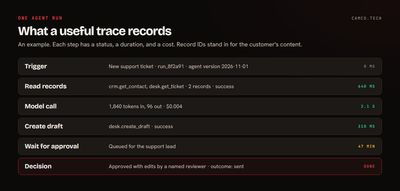
What should you log, and what question does it answer?
Each item here is in the list because someone will eventually need it:
| Log this | What to capture | The question it answers |
|---|---|---|
| Run identity | Run ID, agent name and version, who or what triggered it, timestamps | Which agent did this, and which version was running? |
| Tool calls | Tool name, status, order, record IDs involved | What did it actually do? |
| Approvals | What was proposed, who decided, approve/edit/reject, when | Who allowed this? |
| Data accessed | Systems, modules, record IDs, row counts | Whose data did it touch? |
| Costs | Tokens, model, paid API calls, cost per run | What is this costing, and where? |
| Latency | Total time, time per step, time waiting on people | Where is the time going? |
| Errors | Type, step, retries, how it ended | What's failing, and how often? |
| Outcomes | Completed, escalated, abandoned, accepted, reversed later | Did it work? |
The outcome row is the one engineering dashboards tend to leave out. A run that completes with no errors and gives a wrong answer looks healthy in every technical metric. You often need a later signal, such as a person editing the draft or a customer reopening a ticket, and you'll want to tie it back to the run ID. That's what makes measuring an agent's value possible.
What does a good log entry look like?
Here's an example record for one tool call. It's enough to reconstruct what happened, and there's no customer content in it:
{
  "run_id": "run_8f2a91",
  "agent": "support-reply-drafter",
  "agent_version": "2026-11-01",
  "triggered_by": "desk.ticket.created",
  "step": 3,
  "tool": "crm.get_contact",
  "status": "success",
  "records": ["Contacts:5731970000001233024"],
  "duration_ms": 412,
  "tokens_in": 1840,
  "tokens_out": 96,
  "cost_usd": 0.004,
  "approval": null
}
Notice what's absent: the customer's name, email, and message text. If someone needs those, they can open the record, subject to the permissions they already have. Field names here are ours, not a standard, so use whatever your platform gives you.
Why shouldn't you log raw customer content?
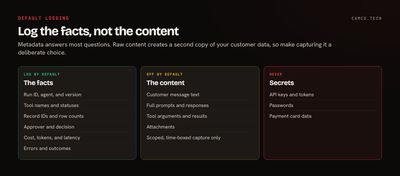
The instinct is to save everything in case you need it. With agents, that means every prompt, every response, and every tool result, and those are full of names, emails, contract terms, and whatever else customers wrote. There are three problems with that:
- It's a second copy of your customer data. It may sit in a different system, with different permissions and a different vendor than your CRM. People who can't see a record in the CRM might be able to read it in the logs.
- It complicates retention and deletion. When a customer asks you to delete their data, or a retention policy says seven years, is the log in scope? What privacy rules apply depends on your situation, so ask your counsel, and plan for the question.
- Logs can expose secrets. Tool arguments and results can contain tokens, keys, and anything else an agent happened to read. Logs tend to be widely readable by technical staff and rarely reviewed.
This isn't a fringe position. The OpenTelemetry GenAI conventions, the emerging standard for tracing AI systems, say instrumentation "SHOULD NOT capture" prompts and outputs by default, and should give users a way to opt in. Those conventions are still in development, so names may change, but the default is the right one.
When is it OK to capture content?
Sometimes metadata won't tell you why an agent gave a bad answer. You can capture content when you've made a decision to do it:
- Make it opt-in and scoped. Turn it on for one agent or one test case, not everywhere.
- Time-box it. Set an end date, and delete the captures when you're done.
- Restrict access. Name who can read it, and log when they do.
- Redact first. Mask personal data and secrets before anything leaves your environment.
- Prefer test data. Reproduce the problem with synthetic records where you can.
Write this policy down before you need it, because the middle of an incident is a bad time to decide.
How long should you keep it?
It depends on what the record is for, and on your own legal obligations, so we won't give you a universal number. Separate two things, because they usually need different treatment:
- Operational logs for debugging. These are high volume and only useful for a short time.
- Audit records of approvals and consequential actions. These are low volume and may need to last as long as your other business records.
What should you watch day to day?
Nobody reads raw logs for fun. Turn them into a few signals with thresholds and a named person who gets alerted:
- Error and retry rate jumping above normal
- Cost per run or per day above a set limit, which often means an agent stuck in a loop
- Records accessed per run far above normal, which may mean a bad query or an agent wandering out of scope
- Approval queue age, since a stale queue tends to get bypassed
- Rejection rate climbing after a new agent version
Tie each to an agent version, so you can see whether last week's change caused it. If an alert fires and the agent can touch customers or money, whoever receives it needs a way to turn the agent off without waiting for a developer.
What do you get from Zoho?
If your agents run on Zoho, a lot of this exists already. The new AI Observability in Zoho Analytics shows which agents ran, who used them, what they accessed, and how they answered, and it tracks usage and cost by team. Zoho's agent platform has built-in observability at each step, and its governance documentation describes audit logs that capture who performed an action, what changed, and when. For code you write yourself, our guide to Deluge try/catch and logging covers the pattern, and for agents connecting from outside, see Zoho MCP.
If you're stitching systems together, start with whatever each platform gives you, then fill the gaps with a shared run ID that follows the work across them. For a custom agent, OWASP's guidance on Excessive Agency is also worth reading. It treats logging and monitoring as a way to limit damage from actions you didn't expect.
Two lessons from a long-running bulk merge we ran for a client changed how we think about this. First, a check can pass while telling you nothing. Ours compared each contact's call count before and after a merge, and it looked in a place that didn't include those calls, so it reported 0 before and 0 after, and passed every time. The calls were fine, as a live test confirmed, but that check could never have caught a lost one. Test your alarms by making them fire.
Second, a process can stay busy and accomplish nothing. After a brief network problem, one run kept going for about 5 hours, failing one record every 31 seconds or so, even though the network had recovered. Fresh processes worked fine. The logs showed it clearly, but we'd have seen it far sooner with an alert on consecutive failures.
What we usually change
On a new agent build, or a review of one that's already running, we usually:
- Add a run ID and agent version to everything.
- Pull customer content out of existing logs, and set a cleanup date for what's already been stored.
- Record approvals with the decision, the person, and the exact item approved.
- Connect later signals, such as edits, reopened tickets, and refunds, back to the run.
- Set cost and error alerts that go to a named owner.
- Write a one-page policy on content capture, retention, and who can read what.
Where to start
Pick your most active agent and try to answer one question from your records alone: what did it do with a specific customer's data last Tuesday? Wherever you get stuck is what to log next. To go further, read our human-approval framework, or talk to our generative AI team if you'd like help building it. You can also tell us what your agents are doing today.