A practical approval framework sorts every automated action into three tiers: read-only operations run freely, reversible writes run with logging and review after the fact, and consequential actions wait for a person. Classify each action once, and you won't have to argue about it again each time you automate something.
We use this on process automation projects with or without AI in the picture. A workflow rule can send the wrong email just as well as an agent can. Agents just make the question harder to avoid, because they choose their own steps.
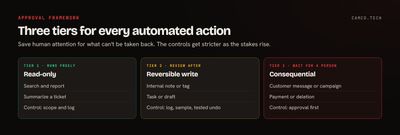
What are the three tiers?
| Read-only | Reversible write | Consequential | |
|---|---|---|---|
| What it does | Looks at data, changes nothing | Changes something you can fully undo | Changes something outside, or something you can't take back |
| Examples | Searching records, running a report, summarizing a ticket | Adding an internal note, tagging a record, creating a task or a draft | Sending a customer message, launching a campaign, taking a payment, deleting data, changing contract terms |
| Control | Limit scope and log access | Log, sample, and keep an undo path | Approval before it happens |
| If it goes wrong | Someone may see what they shouldn't | Someone spends a few minutes fixing it | Customers, money, or legal exposure |
The goal is to spend human attention where it counts. If reviewers approve 200 harmless things a day, they'll also wave through the one that matters.
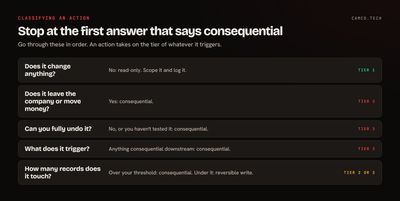
How do you decide which tier an action is in?
Ask these questions in order, and stop at the first one that points to consequential:
- Does it leave the building? Anything a customer, vendor, regulator, or the public can see is consequential, however small it looks.
- Does it move money or commit you to something? Payments, refunds, discounts, quotes, and contract terms are all consequential.
- Can you fully undo it? Have you actually tested the undo? If you can't get back to the exact prior state, it's consequential.
- What does it trigger? Follow the chain. If it fires something consequential, it takes on that tier.
- How many records does it touch? One tag is reversible. Retagging 40,000 contacts in a way that feeds a segment is another matter, so set a threshold.
- Who would be upset to find out? If the honest answer is the CFO or a customer, move it up.
Where do people get this wrong?
Three mistakes are easy to make here.
Ignoring what a write triggers. Updating a deal's stage looks internal. But if a workflow rule on that stage sends an email to the customer and creates an invoice, the agent just did both. Before you call a field update reversible, look at everything listening to that field. Zoho documents what runs on save, and in what order, so you can trace it.
Assuming "undo" exists. Recycle bins expire. Merged records stay merged. A field overwritten with no history is gone. Restoring a value doesn't un-send the notification it triggered. Reversible should mean you've tested it.
Treating read-only as no risk. An agent reading CRM data may pass it to an outside model provider. It could surface a salary to someone asking an innocent question. Read-only is still the lowest tier, but it needs scoping, and you need to know where the data goes.
How should the approval itself work?
A gate needs more than a yes or no button. For each consequential action, decide these in advance:
| Decision | What to settle |
|---|---|
| Who approves | A named role, with a backup. The person or system proposing shouldn't approve its own request. |
| What they see | The exact action, the data behind it, what it'll trigger, and old and new values |
| What they can do | Approve, edit, reject, or ask for more information |
| How long it can wait | An escalation time, and what happens if it expires. Default to not acting. |
| What gets recorded | The proposal, the decision, who made it, and when |
| What binds the approval | The approval covers this exact content and these recipients. If it changes, it needs a new one. |
Thresholds help keep the queue short. A refund under a set amount might be reversible enough to sample, while a larger one waits for a manager. These are your decisions to make, and they should come from the person who owns the risk.
The gate should also be enforced by permissions. If an agent or function has the permission to do the thing, then the approval is a suggestion. Give the permission to a separate step, one that only runs after a person says yes. OWASP's guidance on Excessive Agency makes the same point about minimizing permissions and enforcing authorization downstream. We cover the pattern in more detail in AI agents should draft, not automatically send.
What does an action register look like?
Put the framework into one table that lists each action your automation can take. Here's a short example for a sales and support setup. Yours will differ:
| Action | Tier | Control | Owner |
|---|---|---|---|
| Summarize a customer's history | Read-only | Scoped to the user's permissions, logged | Sales ops |
| Create a follow-up task | Reversible | Logged, spot-checked weekly | Sales ops |
| Add an internal note | Reversible | Logged | Sales ops |
| Update deal stage | Consequential (triggers invoice email) | Rep approves | Sales manager |
| Reply to a customer | Consequential | Rep approves the draft | Support lead |
| Issue a refund | Consequential | Manager approves | Finance |
| Merge duplicate accounts | Consequential | Data owner approves | CRM admin |
| Delete records | Consequential | Tool removed from the agent | CRM admin |
It takes an afternoon to write, and it answers most of the questions an auditor, a client, or your own team will ask. It also makes the next automation faster to approve, because you're only adding rows.
Can actions move between tiers?
Yes, and they should, based on evidence. An action can move down to lighter review when you've got enough logged history to show people approve it almost every time without changes, the category is narrow, and someone still samples the results. We cover the numbers in how to measure AI agent performance.
Actions should also move up. If your team adds a workflow that fires when a field changes, that field's tier may change with it, so review the register whenever automation changes. Newer agents should start stricter than ones with a track record. Reclassify after major changes to the model, the prompt, or the process.
For a wider risk program, the NIST AI Risk Management Framework is a useful voluntary reference. For most small and midsize businesses, a clear register like this one does most of the practical work.
How does this map to Zoho?
If you run on Zoho, the tools for each tier are already there:
- Read-only: Data Policies in Zoho Analytics set access at table, column, and row level. Zoho CRM's read-only Data Insights MCP server analyzes data without modifying records.
- Reversible: Tool selection in Zoho MCP limits writes to what you've chosen, and Deluge logging records what changed.
- Consequential: Agent Studio can require human approval for sensitive actions. Blueprints and Creator approval workflows make the step part of the process, so it can't be skipped.
We classified one job this way on a large contact merge for a client. Reads and dry runs ran freely. Each actual merge run was consequential, because a merge is permanent, so nothing ran without an explicit go from a person, even a small test. The downstream point proved itself too. About 3 times in roughly 45,000 merges, automation elsewhere in the account cleared a website field on the surviving record right after the merge. A check that compared each record to its pre-merge backup caught all of them, and we restored the values. Nobody would have predicted that from reading the merge step alone, which is why you trace what's listening and verify afterward.
What we usually change
When we apply this to an existing setup, we usually:
- List every action each agent, flow, and function can take. There are almost always more than people think.
- Trace what each writable field triggers.
- Remove permissions for anything that shouldn't be automated at all.
- Replace direct actions with drafts and requests for the consequential tier.
- Add thresholds so small items don't clog the queue.
- Assign an owner and a backup to every approval.
Where to start
Take one automation you already run and write its row in the register. Then trace what its writes trigger. That usually surfaces at least one surprise. If you'd like help mapping a whole operation, that's what our process automation work does, or you can tell us what you've automated so far.