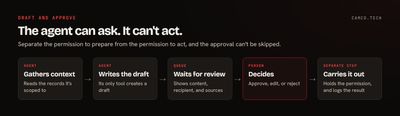
AI agents should prepare consequential actions and people should approve them. Let the agent write the email, build the campaign, queue the payment, and propose the update, then have someone with the authority click the button. You keep nearly all of the time savings, and your business still decides what it says and does.
This holds whichever platform you use. It's the first thing we set up on generative AI projects, and it's a design decision you can enforce in the system, not just a policy you hope people follow.
Why does the last step matter so much?
Drafting is cheap to get wrong. A bad draft costs someone 30 seconds to fix or throw away. Acting is different, because once something's sent, paid, or deleted, the mistake belongs to the outside world.
There's also the question of who's responsible. In Moffatt v. Air Canada, a British Columbia tribunal held the airline liable in 2024 for wrong fare information from the chatbot on its website, and rejected the argument that the chatbot was responsible for its own statements. The award was small, at $812.02. The principle travels: customers and tribunals will generally treat what your systems say as what your company said.
OWASP lists this class of problem as Excessive Agency in its Top 10 for LLM applications, naming excessive functionality, permissions, and autonomy as the usual causes. One of its recommended mitigations is to "require a human to approve high-impact actions before they are taken."
Which actions need approval?
Five categories cover most of what a business should keep behind a person:
| Action | What can go wrong | What the agent does instead |
|---|---|---|
| Customer communications | A wrong promise, wrong facts, wrong tone, or the wrong recipient. A sent message can't be recalled. | Writes the draft, with the sources it used |
| Campaign launches | The same mistake, multiplied by your list size, plus damage to sender reputation | Builds the campaign and segment, sends a test internally |
| Payments and refunds | Money moves, and getting it back depends on someone else | Prepares the transaction with its supporting documents |
| Deletions | Data may be gone for good, along with whatever depended on it | Lists what it proposes to delete, and why |
| Consequential record updates | Changes to contract terms, pricing, credit limits, ownership, or status can trigger other automation | Proposes the change and shows old and new values |
That last row is the one people miss. A single field change in a CRM can fire a workflow that emails a customer or creates an invoice. If you don't know what an update sets off, treat it as consequential. We go through how to classify these in our human-approval framework.
Isn't "ask before sending" enough?
Asking in the prompt helps, but it isn't a control. Agents misread instructions, and they can be steered by content they read, such as a customer email that happens to contain instructions. If the agent holds the send permission, then eventually some combination of inputs will use it.
Build it this way instead:
- The agent's tool creates a draft. It doesn't have a send tool to misuse. On most platforms that's a matter of which tools and scopes you grant.
- A separate step does the sending. It runs on a person's approval and holds the permission the agent lacks.
- What gets approved is what goes out. Tie the approval to the exact content and recipient. If the draft changes after approval, the approval no longer applies.
- The agent can't approve itself. OWASP also recommends enforcing authorization in the downstream system instead of trusting the model to decide what's allowed.
Then log the whole exchange. We cover what to record in AI agent observability.
What makes a review queue work?
Approval only protects you if people really read what they're approving. If the queue is a wall of text with one green button, they'll start clicking it without reading within a week. A few design choices help:
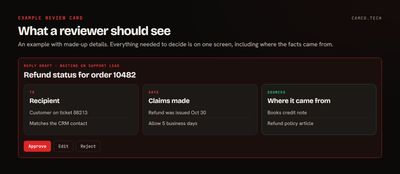
- Show what changed. For record updates, show the old and new values side by side.
- Show the sources. Link the records and documents the agent used, so the reviewer can check a claim in one click.
- Allow edits. Fix-and-approve beats reject-and-redo, and the edits tell you how well the agent is doing.
- Name a backup. A queue that stalls when one person goes on vacation gets bypassed.
- Put it where people work. A queue inside the CRM or a chat channel gets used. A separate portal gets forgotten.
- Only ask about what matters. If every lookup needs a click, reviewers stop paying attention to the ones that count.
Does this cancel out the time savings?
Mostly not. Think of a customer reply that takes a rep ten minutes to research and write. Reviewing a solid draft might take one or two. Those are round numbers for illustration, and yours will vary, so measure it. The time you save was in the research and the writing, and the agent still does those.
The cost that does matter is delay. If a message needs to go out within minutes, a review queue that gets looked at twice a day won't do. Match the review speed to the work, or narrow the category until auto-send is defensible.
When can an agent act on its own?
Autonomy should be earned one narrow category at a time, based on evidence. We'd consider it when all of these are true:
- The action is low stakes and easy to reverse, or the message contains no commitments, such as an appointment confirmation with details pulled straight from a record.
- The category is narrow enough to describe in a sentence.
- You have enough logged history to show people approved nearly all of them unchanged.
- There's a sampling process, so someone still reads a portion after the fact.
- You can turn it off quickly when something changes.
Keep a list of what's been promoted and who signed off. Move categories back when the numbers drop. Some things, such as payments above a threshold, deletions, and anything with legal weight, may never leave the queue, and that's a perfectly good outcome.
We hold our own outbound email to this rule. Our pipeline writes drafts and has no way to send them on its own: sending is a separate step that refuses to run until a person types a confirmation phrase. Part of the reason is what bad data can do. A stale local copy of our contact list once sent an email to a contact at the wrong company, and recipient checks now run against the live CRM. A mistake like that is minor when it's one email. Without a gate, the same bad data can reach a whole batch.
What does this look like in practice?
Most business platforms now support this pattern, including the one we work in most. Zoho's Agent Studio lets you "require human approval before anything happens" for sensitive or high-stakes actions, and Zoho's governance documentation describes choosing which actions run autonomously and which need approval. For agents connecting from outside, Zoho MCP lets you choose exactly which tools each server exposes. We apply this to one product in detail in using AI agents safely in Zoho Campaigns.
What we usually change
When a team has already connected an agent, these are the first changes we make:
- Remove send, pay, and delete tools from the agent's permissions.
- Replace them with tools that create drafts or requests.
- Add a review queue where the team already works, with a named owner and backup.
- Check what each writable field triggers downstream.
- Turn on logging for proposals, approvals, edits, and rejections.
- Set a monthly review of the numbers, and decide what's earned more freedom.
Where to start
List every action your agent can take today, and mark the ones you couldn't undo before lunch. Those go behind a person this week. If you want help with the design, talk to our generative AI team or tell us what your agent has access to.