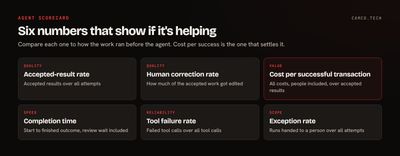
To find out whether an AI agent is helping, measure six things against what the work cost before: accepted-result rate, human corrections, cost per successful transaction, completion time, tool failures, and exception rate. The one that settles the question is cost per successful transaction, because it includes the people reviewing and fixing the agent's work.
Token costs and task counts won't tell you this. A demo that impresses everyone won't either. This post shows how to calculate each metric, with a worked example, and how to decide what to do with the result. It's the scorecard we set up on generative AI projects.
Why start with a baseline?
If you don't know how long the work takes today, or what it costs, you can't say the agent improved it. Before go-live, take a sample of the same work done by people and record:
- Time per transaction, from start to finish, including waiting
- Fully loaded hourly cost of the people doing it
- Error rate, or how often the work comes back
- Monthly volume
Most teams skip this because the agent is already running. You can still estimate from a sample of work done by hand this week. A rough baseline beats none.
Also define the unit of work in one sentence: "one support reply sent," "one invoice coded," "one lead researched and qualified." Everything else gets counted against that.
Which six metrics should you track?
| Metric | How to calculate it | What it tells you |
|---|---|---|
| Accepted-result rate | Accepted results ÷ all attempts | How often the work is usable |
| Human correction rate | Accepted results that were edited ÷ accepted results | How much cleanup people do |
| Cost per successful transaction | All costs ÷ accepted results | Whether it pays |
| Completion time | Start to finished outcome, including review wait | Whether the work gets done sooner |
| Tool failure rate | Failed tool calls ÷ all tool calls | Whether the plumbing is reliable |
| Exception rate | Runs handed to a person ÷ all attempts | How much of the work it can handle |
Three details make these honest.
Divide by attempts. If you divide by completed runs, failures vanish from the math and every agent looks better than it is.
Count time-to-done, not time-to-draft. An agent can draft in 20 seconds while the draft sits for six hours in a queue. The customer experiences the six hours.
Track corrections by size. A typo fix and a rewritten paragraph are different. Sort them into light edits and heavy edits. If the heavy edits were basically rewrites, count those as rejected.
To capture all of this, you need the logging covered in AI agent observability.
What does it look like with real numbers?
Here's a made-up example of a support-reply agent over one month, to show how the math works. These aren't benchmarks.
Of 1,000 attempts, 640 were accepted unchanged, 160 were accepted after edits, 120 were rejected, and 80 failed or got handed off. That gives an accepted-result rate of 80% (800 of 1,000), a human correction rate of 20% (160 of 800), and an exception rate of 8%.
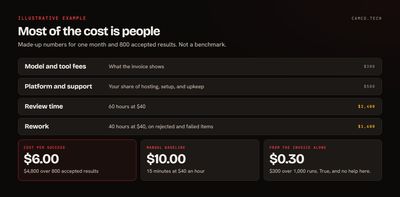
| Cost for the month | Amount |
|---|---|
| Model and tool fees | $300 |
| Platform and support | $500 |
| Review time: 60 hours at $40 | $2,400 |
| Rework on rejected and failed items: 40 hours at $40 | $1,600 |
| Total | $4,800 |
That works out to $6.00 per successful transaction. If a person takes 15 minutes per reply at $40 an hour, the manual cost is $10.00, so the agent saves $4.00 per accepted reply, or $3,200 a month, on top of whatever value you get from faster replies.
Now look at what the vendor invoice alone suggests: $300 across 1,000 runs, or 30 cents per run. That number is true, and it's useless for this decision. In this example, 83% of the true cost is people. If review time doubled, cost per success would climb to $9.00 and most of the savings would be gone. That's why how you design the approval step has as much effect on ROI as which model you pick.
How can these numbers mislead you?
Each metric has a way of looking good while things get worse:
- Rubber-stamping. A high acceptance rate may mean people stopped reading. Audit a random sample each month with someone who knows the work. If the audit disagrees with the acceptance rate, trust the audit.
- Cherry-picking. If people only send the agent easy cases, its numbers rise while the hard work stays with your team. Measure the whole mix, or compare the same case types.
- Hidden rework. A reply accepted today that brings the customer back tomorrow isn't a success. Tie downstream signals, such as reopened tickets, refunds, or corrected records, back to the run for a while.
- Shifted work. If the agent saves support two hours and costs QA three, you've lost an hour. Include anyone who touches the output.
- Hours saved that nobody uses. Saved time only has value if it goes somewhere, such as handling more volume, faster response, or work you were skipping. Ask what actually changed.
Also watch for drift. Models, prompts, your products, and your data all change, so a good result in month one doesn't guarantee month six. The NIST AI Risk Management Framework includes Measure as one of its four functions for a reason: this is ongoing work.
What should you do with the results?
Set the thresholds before you look at the numbers, so you don't talk yourself into a result. Here's a simple way to read them:
| What you see | What it usually means | What to do |
|---|---|---|
| Cost per success well below baseline, audits clean | It's working | Keep it, and consider giving it more volume |
| Good acceptance, high correction rate | Close, but it's missing context | Fix the data, instructions, or examples |
| Low acceptance on some case types | The scope is too wide | Narrow it to what it does well |
| High tool failures | An integration problem, not an AI problem | Fix the connections and permissions first |
| High exception rate, long queues | Review is the bottleneck | Change the routing and staffing of approvals |
| Cost above baseline after two rounds of fixes | Wrong job for an agent | Stop, or replace it with plain automation |
That last row is worth taking seriously. Many processes don't need an agent at all. If the steps are fixed and the rules are clear, a workflow rule or a custom function will do it for far less, the same way every time.
How do you track this in Zoho?
If your agents and data live in Zoho, you can put this scorecard in one place. Log runs to a table in Zoho Analytics, keep your definitions in the semantic layer so "accepted" means one thing, and use the new AI Observability view for usage and cost by team. Approval outcomes can come straight from the CRM or Creator records where people review the work.
A real run shows why one success number isn't enough. A bulk merge we ran for a client finished with 10,342 groups attempted: 7,226 succeeded, 2,755 were skipped as stale, 23 were flagged for attention, and 338 errored. That's a 70% success rate, which sounds bad until you look underneath. 305 of the errors happened because a person was merging the same records by hand at the same time, so nothing went wrong, and the skips were records that had already changed. Of the 23 flagged, 20 turned out to be fine and 3 were real problems, all restored from backup. Counting outcomes by type told us far more than the headline percentage would have. That was an automated pipeline, not an AI agent, but the same discipline applies.
What we usually change
When we review an agent someone's already running, the first changes tend to be:
- Define the unit of work and what "accepted" means.
- Add an estimate of review and rework time to the cost calculation.
- Change the denominator to attempts.
- Start a monthly random-sample audit.
- Connect downstream signals back to the run.
- Agree on keep, fix, and stop thresholds with whoever owns the budget.
Where to start
Pick one agent, write down the unit of work, and spend a week timing how people do it by hand. If you already have the agent live, measure both for a few weeks. If you'd like help setting up the scorecard or deciding what to automate at all, talk to our generative AI team or send us what you've got.