Deluge's try/catch stops one error from killing a whole function, and logging tells you what happened after the fact. You need both. A function with try/catch and no logging fails quietly. A function with logging and no try/catch leaves a good trail up to the point where it crashed. This guide covers both, with patterns from automations we run for clients.
Error handling and logging are a standard part of every process automation build we deliver, and they're usually the first things we add when we inherit someone else's code.
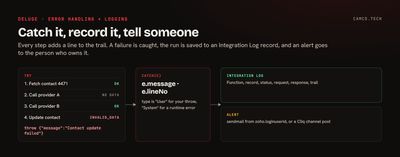
How try catch works in Deluge
The syntax, from Zoho's try catch reference:
try
{
	// CODE THAT MIGHT FAIL
	productsLst = {"Creator","CRM","Cliq"};
	productStr = productsLst.get(10);
}
catch(e)
{
	info e.message;
	info e.lineNo;
}
info "THIS LINE STILL RUNS";
When something inside try fails, Deluge stops the try block, runs catch, and carries on after it. The exception variable has read-only attributes:
| Attribute | Contains |
|---|---|
e.message |
The error message |
e.lineNo |
The line that raised it |
e.type |
System for a runtime error, User for your own throw |
e.data |
Extra data passed with a throw, or null |
Printing e on its own gives both the line and the message, which is usually what you want in a log.
If a function doesn't catch an error, Deluge passes it up to whatever called the function. When nothing catches it, the run ends and is marked failed.
What try catch won't catch
This is where most error handling falls short. A catch only runs when Deluge raises an exception. Plenty of failures don't raise one.
CRM integration tasks such as zoho.crm.updateRecord return the API's response. When the update fails, that response is an error, like INVALID_DATA, and the function carries on as if nothing happened. The same goes for an invokeurl call that gets a 401 or 500 back: the call worked, the request didn't.
So check the response, and turn a failed result into an exception with throw:
updateResp = zoho.crm.updateRecord("Contacts",contactIdInt,updateMp);
if(updateResp.containKey("Modified_Time") = false)
{
	throw {"message":"Contact update failed","data":updateResp};
}
Zoho's throw reference covers the options. You can throw a text message or a map with a message and optional data, and you can rethrow a caught exception from an inner catch to an outer one. For invokeurl, add detailed:true and check responseCode, as our invokeUrl guide shows.
Don't let one bad record stop the batch
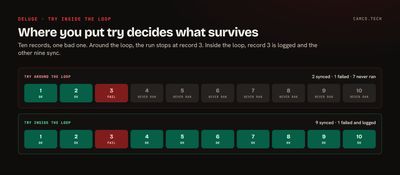
Where you put the try matters. Wrap a whole loop, and the first bad record ends the run. Wrap the inside of the loop, and each record succeeds or fails on its own:
//
// SYNC EACH ROW; RECORD THE OUTCOME PER ROW SO NOTHING FAILS SILENTLY
//
syncedInt = 0;
failedLst = List();
for each rowMp in rowsLst
{
	try
	{
		resultStr = standalone.sync_contact_sa(rowMp);
		syncedInt = syncedInt + 1;
	}
	catch(e)
	{
		failedLst.add(rowMp.getJSON("external_id") + ": " + e.message);
	}
}
info "SYNCED: " + syncedInt + " FAILED: " + failedLst.size();
On one data sync we run for a client, each row's outcome is written back to the source table as it's processed: "Synced" with a timestamp, or "ERROR:" with the reason. The next run skips rows that synced and retries the ones that didn't, and anyone can filter the table to see what failed and why. Cryptic API messages get translated on the way in. "The id given seems to be invalid," for instance, is stored as "Record was deleted prior to sync."
Logging: where Deluge output goes
info is Deluge's print statement. In Zoho CRM, its output goes to the function's logs. Zoho's function analytics page lays out where to find them:
- Logs: Setup > Developer Hub > Functions, open the function, then the Logs tab. It shows recent runs, including your
infooutput. - Failures: a Failures tab on the Functions page lists every failed run across the org, with the function, module, time, and reason. Each row has a Rerun button, and you can rerun several at once.
- Analytics: run counts and trends, for the org or a single function.
That's enough for debugging. It isn't enough for an integration someone depends on, for two reasons. The logs are only visible to admins in Setup, and they show recent runs, not a history you can report on. For that, write your own log.
Keep a step-by-step trail
The most useful log we've written is also the simplest: a text variable that every step adds a line to.
In a data enrichment app we built in Zoho Creator, each contact runs through a waterfall of four data providers. As the function works, it appends to a trail:
trailStr = "";
trailStr = trailStr + "START " + zoho.currenttime + " contact " + recIdStr + "\n";
trailStr = trailStr + "Trying provider A\n";
// ... CALL PROVIDER A
trailStr = trailStr + "Provider A: no mobile on file\n";
trailStr = trailStr + "Trying provider B\n";
// ... CALL PROVIDER B
trailStr = trailStr + "Provider B: mobile found, stopping\n";
At the end, the whole trail is saved with the contact's enrichment record, along with every provider's raw response. When a user asks why a contact has a particular number, or why it has none, the answer is one record away: which providers were tried, in what order, and what each one said.
Each line names the step and its outcome. That's the rule worth keeping: one line per step, with the record and the result, written so someone who didn't write the code can read it.
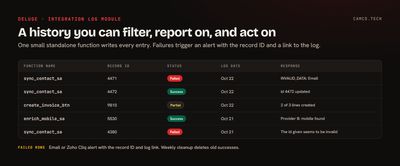
Log to an Integration Log module
For anything that talks to another system, we add a custom module, usually called Integration Log, with these fields:
| Field | Type | Holds |
|---|---|---|
| Function Name | Single line | Which function ran |
| Record ID | Single line | The record it was working on |
| Status | Picklist | Success, Partial, or Failed |
| Request | Multi-line | What was sent |
| Response | Multi-line | What came back |
| Trail | Multi-line | The step-by-step trail |
| Log Date | Date | The day it ran (Created Time keeps the exact time) |
A small standalone function writes the entry, so every other function logs with one line:
//
// STANDALONE: write_log_sa(functionStr, recordIdStr, statusStr, requestStr, responseStr, trailStr)
//
logMp = Map();
logMp.put("Name",functionStr + " " + recordIdStr);
logMp.put("Function_Name",functionStr);
logMp.put("Record_ID",recordIdStr);
logMp.put("Status",statusStr);
logMp.put("Request",requestStr.left(30000));
logMp.put("Response",responseStr.left(30000));
logMp.put("Trail",trailStr.left(30000));
logMp.put("Log_Date",zoho.currentdate);
logResp = zoho.crm.createRecord("Integration_Logs",logMp);
return logResp.getJSON("id");
Now the history is a CRM module like any other. Build a view of today's failures, a report of failures by function, or a dashboard for the person who owns the integration. Zoho Creator works the same way with a form in place of the module.
For webhooks, log the raw payload before you parse it. On an inbound SMS integration we built, the first thing the catching function does is store the entire request in a field on the new record. If the parsing ever breaks, the original message is still there to fix and replay.
Send an alert when it fails
A log nobody reads is a slow way to find out. Alert on failure from the catch block, using the same pattern as Zoho's own example:
catch(e)
{
	logIdStr = standalone.write_log_sa("sync_contact_sa",recIdStr,"Failed",requestStr,e.toString(),trailStr);
	sendmail
	[
		from :zoho.loginuserid
		to :"ops@yourcompany.com"
		subject :"Error on sync_contact_sa"
		message :"Record: " + recIdStr + "<br>Error: " + e.message + " (line " + e.lineNo + ")<br>Log: " + logIdStr
	]
}
Send from zoho.loginuserid. If the team lives in Zoho Cliq, post to a channel instead, with zoho.cliq.postToChannel and a Cliq connection:
cliqResp = zoho.cliq.postToChannel("integrationalerts","sync_contact_sa failed on " + recIdStr + ": " + e.message,"cliq_connection");Put the record ID and a link to the log entry in every alert. "Something failed" gets ignored. "Contact 4471 failed: invalid email, log entry attached" gets fixed.
Clean up old logs
A busy integration writes thousands of log records a month. Keep what you'll use and delete the rest on a schedule. A weekly scheduled function can find successful entries older than 90 days with a search and delete them through the CRM API, which takes up to 100 IDs per call, per Zoho's delete records reference:
//
// SCHEDULE: WEEKLY, DELETE SUCCESSFUL LOGS OLDER THAN 90 DAYS
//
cutoffStr = zoho.currentdate.subDay(90).toString("yyyy-MM-dd");
criteriaStr = "((Status:equals:Success)and(Log_Date:less_than:" + cutoffStr + "))";
oldLogsLst = zoho.crm.searchRecords("Integration_Logs",criteriaStr,1,100);
idsLst = List();
for each logMp in oldLogsLst
{
	idsLst.add(logMp.getJSON("id"));
}
if(idsLst.size() > 0)
{
	deleteResp = invokeurl
	[
		url :"https://www.zohoapis.com/crm/v8/Integration_Logs?ids=" + idsLst.toString(",")
		type :DELETE
		connection:"zcrm"
	];
}
Keep failures longer than successes. Failed entries are the ones you'll want when someone asks what happened in March.
What we usually add to inherited code
- A
tryinside every loop that processes records, not around it. - A success check and a
throwafter every CRM create and update. detailed:trueand a status check on everyinvokeurlthat writes data.- A trail variable in any function with more than a few steps.
- An Integration Log module and a one-line logging function.
- An alert from every
catchthat names the record and links the log. - A scheduled cleanup so the log stays small.
Make your automations report on themselves
Good error handling doesn't stop things from failing. It makes sure that when they fail, someone knows within minutes, knows which record, and has the log to fix it. If your Zoho automations fail without anyone noticing, that's what our process automation and Zoho rescue work fixes. Our Deluge tips post shows the enrichment app these trails come from.