To use AI agents safely in Zoho Campaigns, give them only the tools they need, let them prepare campaigns as drafts, and keep the send decision with a person. Zoho added Model Context Protocol support to Campaigns in late October 2026, and it leaves the review step up to how you configure things. That's a good design, but it means the setup is your job.
This post is for marketing and ops teams that want the time savings without a bad send to the whole list. It covers what agents can do, how to scope them, and a practical gate before anything goes out. If you'd like help setting this up, it's part of our generative AI work.
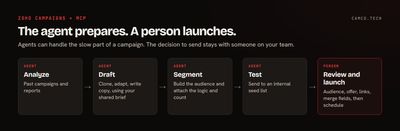
What can AI agents do in Zoho Campaigns?
Zoho's press release says compatible agents can combine supported operations into a broader workflow, driven by natural-language instructions. It names campaign preparation, audience management, segmentation, and performance analysis, and gives three examples:
| Zoho's example | What it touches | How we'd treat it |
|---|---|---|
| Analyze the last 10 campaigns, find a strong performer, clone it, and adapt it for a new promotion | Reports, then a new draft | Let it run through to a draft |
| Find contacts who haven't engaged in 90 days, create a segment, tag them, and prepare a campaign | Contact tags and segments, then a draft | Review the segment, because tags can feed other automation |
| Build a Black Friday campaign for a segment, reuse HTML content, send a test, and schedule delivery | Everything, including the schedule | Agent stops at the test send. A person schedules. |
That third row is where we'd draw the line. The first 90% of that task is the tedious part, and an agent can do it well. The last step is the one a person should own.
The same release adds things that help with quality: Campaign Context applies a shared brief with your brand voice, offer details, and audience information across campaigns, Zia Content Analyzer checks spelling, grammar, and style and can draft subject lines and copy, and frequency capping limits how often a contact hears from you across email, SMS, and WhatsApp. Set those up first, since they apply whether a person or an agent builds the campaign.
Why does a campaign send need a person?
A bad email to 50,000 people can't be recalled. A wrong segment, a broken merge field, a 40% discount that should have been 4%: none of those have an undo. And the cost lands on your sender reputation and your customers' patience, both of which take far longer to rebuild than the campaign took to draft.
We make the general case in AI agents should draft, not automatically send. For campaigns, the risk is multiplied by list size.
How do you limit what an agent can do?
Permissions are the control that holds up when an agent gets something wrong. According to Zoho's MCP FAQ, "The access an MCP server provides to an MCP client is entirely dependent on the configured MCP Tools." So the list of tools you add is the list of things the agent can do.
We walk through the setup in our Zoho MCP guide. For Campaigns, we'd sort tools into three groups when you build the server:
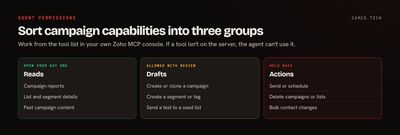
The exact tool names depend on what's in your Zoho MCP console, so work from that list, not ours. Three habits make this hold up:
- Use one server per job. Zoho's FAQ also recommends splitting large tool sets across servers, because too many tools make it harder for the model to pick the right one. An "analysis" server and a "drafting" server are easy to reason about.
- Connect as a limited user. If the agent acts with the signed-in user's access, make sure that user doesn't hold more than the job needs.
- Treat a prompt as guidance, not a control. "Never send without asking" belongs in the instructions, but the tool list is what enforces it.
What should a person check before a send?
Agents are quick at producing something that looks finished, so make the review specific. This is the list we'd give a marketer:
- Audience. What's the segment logic, and how many contacts does it return? Does that number make sense against last time?
- Exclusions. Are suppression lists, recent customers, and anyone who shouldn't get this offer excluded?
- Offer and facts. Are prices, dates, discount codes, and links correct? Did you click each one?
- Merge fields. Does the test send show real values, including for a contact with a blank first name?
- Sender and reply-to. Are they the right ones for this audience?
- Claims. Did the agent write anything your company can't back up?
- Timing and caps. Does it collide with another campaign? Is frequency capping on?
Have the agent attach this as a summary to each draft: segment definition, contact count, source campaign, and what it changed. Reviewing a summary takes minutes. Reverse-engineering a campaign takes much longer, and people skip it.
Can you build a real approval gate?
Yes, if you want the step enforced by the system. One pattern we like is to give the agent no send access at all. It creates a request record, a person approves it in CRM or Creator, and a function with the send permission does the send.
Campaigns has a Send Campaign API that takes a campaign key and needs the ZohoCampaigns.campaign.UPDATE scope. Here's a sketch of that function, with an example module and fields, and a connection name you'd replace with your own:
//
// RUNS ONLY AFTER A PERSON APPROVES THE CAMPAIGN REQUEST
//
requestMp = zoho.crm.getRecordById("Campaign_Requests",requestIdInt);
statusStr = ifnull(requestMp.getJSON("Approval_Status"),"");
campaignKeyStr = ifnull(requestMp.getJSON("Campaign_Key"),"");
try
{
	if(statusStr = "Approved" && campaignKeyStr != "")
	{
		paramsMp = Map();
		paramsMp.put("campaignkey",campaignKeyStr);
		paramsMp.put("resfmt","JSON");
		sendResp = invokeurl
		[
			url :"https://campaigns.zoho.com/api/v1.1/sendcampaign"
			type :POST
			parameters:paramsMp
			connection:"zcampaigns"
		];
		info sendResp;
	}
}
catch(e)
{
	info "ERROR: " + e;
}
The agent's connection never holds that send scope. It can ask, but only a person's approval makes the send happen. A Creator approval workflow works well as the front end if you want a proper queue with history.
How should you roll this out?
Go in stages and let the evidence move you forward:
| Stage | Agent can | Move on when |
|---|---|---|
| 1. Read | Analyze reports and suggest ideas | Its analysis matches what your team finds by hand |
| 2. Draft | Clone and adapt campaigns, write copy | Most drafts need only light edits |
| 3. Segment | Build segments and tags for review | Contact counts and logic hold up on review |
| 4. Test | Send test emails to an internal list | Tests are consistently clean |
| 5. Decide | Revisit sending for narrow, low-stakes cases | You've got the numbers to back it up |
Many teams should stay at stage 4 for promotional sends, and that's a fine place to stay. You're already saving most of the time. We cover how to track it in how to measure whether an AI agent is helping.
We run our own outbound email this way, through Gmail, not Campaigns. An automated pipeline researches accounts and writes the emails, and everything it produces lands as a draft. Sending is a separate script that stays in preview mode unless a person types a specific confirmation phrase (ours is "go go gadget"), and it paces and caps what goes out. The check is in the code, so a confused prompt can't get past it.
What we usually change
When we set this up, these are the changes we usually make first:
- Separate MCP servers for analysis and drafting, with send and delete tools left out of both.
- A named approver for each list or brand, with a backup for when they're out.
- A shared Campaign Context brief, so agents and people start from the same voice and offer details.
- Frequency capping on across channels before any agent work starts.
- An internal seed list for test sends.
- A weekly look at what the agent did, with a short list of what to tighten.
Where to start
Connect an agent to your campaign reports with read-only access, and ask it which of your last 10 campaigns did best and why. You'll learn a lot from that, with nothing at risk. When you're ready for drafts and approvals, our generative AI team can build the setup with you, or you can tell us how your team runs campaigns today.