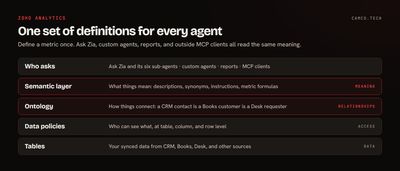
The Zoho Analytics semantic layer is where you tell AI what your business terms mean. You define a metric once, with a description, synonyms, and instructions, and every agent and report uses that definition. It's the difference between an agent that guesses which column means revenue and one that's been told.
Zoho shipped it as part of the new agentic Zoho Analytics on October 28, 2026. Most of what's been written since repeats the announcement. This post covers the part that decides whether it works in your account: agreeing on the definitions. That's the same work we do on any Zoho Analytics implementation, and it's a business process question long before it's a software one.
What does the semantic layer actually do?
An agent looking at your tables sees column names. It can't tell that Amount on a deal is a forecast and Total on an invoice is money you billed. It doesn't know your team says "logo" when it means a new customer, or that test accounts should never count.
Zoho's announcement calls the semantic layer "a business glossary for AI." Here's what goes in it, and what each piece prevents:
| You add | What it holds | What it prevents |
|---|---|---|
| Description | What the metric or field means in plain English | The agent picking the wrong column because the names look alike |
| Synonyms | The words your team actually uses | "Logos" or "bookings" returning nothing, or the wrong thing |
| Instructions | Rules for using it | Test accounts in revenue, or open deals counted as won |
| Formula | The calculation, written once | Two reports computing gross margin two ways |
Zoho's Formula Agent can write the metric formulas, and those formulas can be reused across reports and agents. Semantic models are built without code, and you can keep separate ones for different teams. That matters more than it sounds, because sales and finance often use the same word for different things and both are correct.
How is it different from the ontology?
The two ship together and get mentioned together, but they answer different questions.
The semantic layer answers "what does this mean?" The ontology answers "how does this connect?" It maps entities like customers, orders, products, and vendors and the relationships between them. Zoho's example is the one most Zoho customers care about: linking a CRM contact to a Books customer and a Desk requester, so an agent can follow one customer across all three apps.
Both are native to Zoho Analytics, so you don't need a separate data platform to use them.
Why do AI agents need one?
Ask Zia is now a coordinating agent with six sub-agents for analysis, visualization, data preparation, formulas, machine learning code, and SQL. They all share one semantic layer, one ontology, and one conversation context. Add your own custom agents and any outside tools connected through the Analytics MCP server, and you can have a lot of AI reading the same numbers.
That's where definitions pay off. An agent that answers a question wrong once can be corrected. An agent that writes its own idea of "active customer" into a dashboard, a forecast, and a board summary produces three wrong artifacts that look right, and nobody may catch it.
A good test of whether you need this: ask two department heads what your churn rate was last quarter, and how it's calculated. If you get two answers, an agent has no way to give you the right one, because your business hasn't decided yet.
What should you define first?
Don't try to document every field. Start from the questions people will really ask, which is also Zoho's own advice for building an agent data foundation. For most companies that's 10 to 20 metrics, and these are the ones we'd look at first because they tend to carry hidden disagreements:
| Term | The question to settle |
|---|---|
| Revenue | Booked, invoiced, or collected? Net of refunds? |
| Active customer | Bought in the last 12 months, has an open contract, or logged in recently? |
| Churn | Logos or dollars? Does a downgrade count? |
| Qualified lead | Who decides, and which field records it? |
| Pipeline | Which stages count? Is it weighted by probability? |
| On-time delivery | Measured against the promised date or the requested date? |
For each one, write the definition down the way you'd explain it to a new hire, then get the person who owns the number to sign off. That owner matters. When sales and finance disagree six months from now, someone needs the authority to change the definition, and the change should be made in one place.
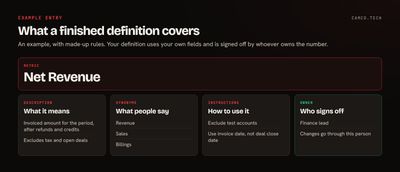
The entry above is an example of what a finished definition covers. Yours will use your own fields and rules.
We ran into exactly this on a recent scoreboard for a sales organization. "Scheduled" turned out to mean anything not marked Cancelled, which swept in event registrations. Credit for an appointment could reasonably go to whoever created it or whoever owned it. And "talk" counted every call, including about 264,000 in one 30-day window with no call result and an average length of 22 seconds, most of them dialer attempts. Nobody had made a mistake. Those were decisions nobody had needed to spell out until a screen started ranking reps on them, and the owner had to stop and think about some of them. An agent reading the same data would have repeated every one of those choices without mentioning them.
How do you keep agents inside the lines?
Definitions tell an agent what things mean. They don't decide what it's allowed to see. Zoho handles that separately, and you should set both before anyone relies on the answers:
- Scoping restricts an agent to specific data and dashboards. Zoho's example is a regional sales agent that only sees its own team's data.
- Data Policies define access at the table, column, and row level, and assign it to users or roles.
- AI Observability shows which agents ran, who used them, what they accessed, and how they answered. It also tracks AI usage and cost by team.
- Sandbox and deployment management gives you a separate development environment and rollback to earlier versions, so a changed definition doesn't go straight to production.
We go deeper on what to record in AI agent observability.
How do you test that it worked?
Write a set of 20 or so questions your team asks every month, with the correct answers worked out by hand from a closed period. Ask them through Ask Zia before you add definitions and again after.
Check three things:
- Did it use the right metric and the right time period?
- Does the number match your hand-worked answer?
- Do the same question and a reworded version of it return the same result?
When an answer is wrong, the fix is usually in the definition or the synonyms, so correct it there. Keep the question set and rerun it whenever a definition changes. That's the closest thing you'll get to a regression test for business meaning.
What about messy data?
A semantic layer tells agents what a field means. It can't make the values in that field correct. If your accounts are duplicated or your dates are in three formats, the definition sits on top of the same mess. Clean that first with Zoho DataPrep, which Zoho positions upstream in the same stack: source systems, then DataPrep, then Analytics, then agents.
When can you use it?
The release is in the cloud now and rolling out gradually by region and user. Zoho says preview versions of the ontology and semantic model will roll out globally over four to eight weeks from the October 28 announcement, and the on-premise version gets these updates in Q1 2027. Pricing is unchanged, and every plan includes monthly Zoho LLM credits. If you don't see it in your account yet, that's probably why.
What we usually change
When we set up Analytics for AI use, the work tends to look like this:
- Run a session with each department to surface the terms they use and where they disagree.
- Name an owner for each metric, usually whoever already answers for that number.
- Remove test records and retired fields so agents never see them.
- Build one semantic model per team where the teams truly need different views, and keep shared metrics identical across them.
- Set Data Policies before opening anything up to agents.
- Keep the test questions and rerun them after every definition change.
The software part is quick. Getting people to agree on what "active customer" means usually takes longer, and it's worth doing whether or not you ever turn on an agent.
Where to start
Pick the one report your leadership team argues about most, and define every metric on it. If you want a hand running those sessions and setting up the model, that's part of our Zoho Analytics work. You can also tell us what you're trying to answer.