Use Zoho Flow when you're connecting apps with a trigger and a few steps. Use Creator Integration Flows when that integration belongs with a Creator app you already run. Use Catalyst when the job needs real backend code, and keep custom code outside Zoho for cases where you already own a codebase or a policy requires it.
The hard part is rarely capability, since a simple sync can be built in all four. The better question is who will maintain it in two years. This is how we make the call on API and integration projects.
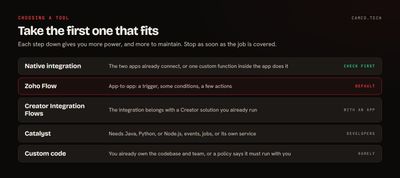
How do the four options compare?
| Zoho Flow | Creator Integration Flows | Catalyst | Custom code | |
|---|---|---|---|---|
| Best for | App-to-app automation | Integrations that belong with a Creator solution | Backend logic and services | Logic you already own or must host yourself |
| How you build | Drag-and-drop builder | Drag-and-drop builder | Code | Code |
| Scripting | Deluge custom functions | Deluge | Java, Python, Node.js | Anything |
| Connectors | 1,000+ cloud and on-prem apps | 800+ application ecosystem | You call the APIs | You call the APIs |
| Who can maintain it | Admins and analysts | Creator builders | Developers | Your developers |
| Monitoring | Flow history | Dashboard and task history | Platform logs | Whatever you build |
Should you check for a native integration first?
Yes, always. Before any of these four, look at whether the two apps already connect. Zoho's own apps integrate with each other out of the box in many places, and a built-in integration is the cheapest thing to own because you don't maintain it at all.
Also consider whether this is really an integration. If the logic happens inside one app, such as updating related deals when an account changes, a CRM custom function is the natural home.
When is Zoho Flow the right choice?
Zoho Flow is the default for connecting apps. It takes triggers from polling, webhooks, templated emails, and RSS feeds, gives you logic elements to branch, and has a plain-English builder through Zia.
Pick it when:
- The job reads like a sentence: when a form is submitted, create a lead, add to a list, and post to a channel.
- The person who runs the process should be able to open it and understand it.
- Connectors exist for most of the apps involved.
- Volumes are event-by-event rather than big scheduled batches. For moving tens of thousands of records at once, use something like the CRM Bulk Write API.
When a value needs cleaning between steps, a small Deluge custom function handles it without leaving Flow. Here's one we'd use to normalize a US phone number before it goes into CRM:
//
// NORMALIZE A US PHONE NUMBER FOR THE NEXT FLOW STEP
//
digitsStr = ifnull(phoneStr,"").replaceAll("[^0-9]","");
if(digitsStr.length() = 11 && digitsStr.startsWith("1"))
{
	digitsStr = digitsStr.subString(1);
}
resultMp = Map();
resultMp.put("phone_e164",if(digitsStr.length() = 10,"+1" + digitsStr,""));
resultMp.put("is_valid",digitsStr.length() = 10);
return resultMp;
The next step in the flow can branch on is_valid. Rows that fail go to a person instead of into your CRM.
When do Creator Integration Flows make more sense?
Zoho lists Integration Flows as a solution type inside Creator, alongside Applications and BI & Analytics. The builder covers the same kind of ground: triggers including webhooks, schedules, conditional branches, delays, and Deluge when you need it. You get a dashboard of recent executions, and task histories you can filter by status or date.
The deciding factor is where the rest of the work lives. Choose it when:
- You already build in Creator and want the integration managed in the same place by the same people.
- The process needs its own screens, data model, or approval steps, so you're building a Creator app anyway.
If you're only moving data between two systems and have no Creator app, Flow is the shorter path.
When do you need Catalyst?
Catalyst is Zoho's platform for building and running backend code. It has Functions for backend logic, Job Scheduling to run functions and webhooks, Signals as an event bus, AppSail for managed apps with custom runtimes, Slate for front ends, and QuickML for prediction models and RAG pipelines. It supports Java, Python, and Node.js.
Reach for it when:
- You need a language library, such as document processing or a data science package.
- A partner or payment system needs to send you webhooks, and you want real validation, retries, and queueing behind the endpoint.
- The work is long-running or event-driven, with several steps that should fail and retry independently.
- You're building a service that other systems will call, or a backend for a portal or mobile app.
For a lighter webhook catcher with a few steps of logic, a CRM function exposed as a REST API may do the job first.
The trade you're making is a real one. Catalyst code needs a developer to change it, along with the habits that go with that: source control, tests, and a deploy process. It's a great place for work that deserves that treatment, and more than a simple sync needs.
When is custom code outside Zoho justified?
Less often than people expect. The good reasons are organizational:
- You already have a development team and a codebase, and this logic belongs with it.
- A contract or security policy requires it to run in your own environment.
- The integration is really part of your own product, and Zoho is one of several systems it talks to.
"Our last developer preferred Python" isn't one of them. Code outside Zoho still needs hosting, monitoring, secret storage, and someone on call, and all of that keeps costing money after launch. If your concern is language support, Catalyst covers Python and Node.js inside Zoho.
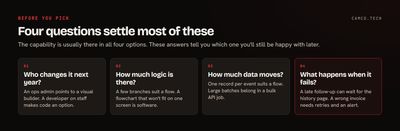
What questions should you ask before you pick?
Four questions settle most of these decisions:
- Who changes this next year? If it's your ops admin, stay in a visual builder. If you have developers on staff, code is an option.
- How much logic is there? A handful of branches suits Flow. If you're drawing a flowchart that won't fit on one screen, you're probably writing software, so treat it that way.
- How much data moves, and how often? One record per event suits a flow. Big scheduled batches belong in a bulk API job.
- What happens when it fails? If a missed run means a follow-up goes out a day late, the built-in history is plenty. If it means a wrong invoice, you want explicit error handling and logging, retries, and an alert to a named person.
Can you start simple and move later?
Yes, and we'd usually recommend it. A Flow that proves the process is cheap, and it teaches you the real edge cases. If it later outgrows the builder, you move the heavy step into a Deluge function or a Catalyst function and keep the flow as the trigger. You rarely have to rewrite everything at once.
What causes trouble is the reverse: starting with custom infrastructure for a sync that fires ten times a day, then paying to maintain it indefinitely.
We learned the cost of the wrong shape on an outbound sales system of our own design. Our first version ran two workflow functions on every call, in a CRM logging about 12,000 outbound calls a day. That added roughly 20,000 function runs a day and used up the account's daily function allowance, which stopped every function in the org until we paused those two. The fix was one scheduled function that processes calls in a batch every 2 hours. The business logic barely changed. The trigger did, and that's the kind of move you can make without rebuilding everything.
What we usually change
When we review an account's integrations, we tend to find some version of these:
- The same sync built twice, once in Flow and once in a function, both still running.
- Connections tied to a former employee, which should be moved to a shared owner.
- Flows with no failure path, where a bad record just stops.
- A heavy batch job running one record at a time through a flow, which belongs in a bulk API call.
- Logic nobody documented. Zoho's flow builder supports notes, so use them.
Each of these is a setup problem, and each is fixable without changing tools.
Getting it right the first time
Write the integration out in one paragraph: what starts it, what it changes, who owns it, and what happens when it fails. The right tool is usually obvious by then. If it isn't, or you've inherited a pile of flows nobody can explain, our integration team can sort it out. You can also send us what you're trying to connect.